


Ref Sec21.
PATTERN
Alias for PPL PATSET PATTERN=. Specifies or restores the default pattern. PATTERN is also implemented as a qualifier for the 2-Dimension graphics commands FILL, CONTOUR/FILL, SHADE, and POLYGON commands.
Not available in PyFerret
yes? PATTERN patt_name
or
yes? FILL/PATTERN=patt_name var
yes? SHADE/PATTERN=patt_name var
yes? POLYGON/PATTERN=patt_name var
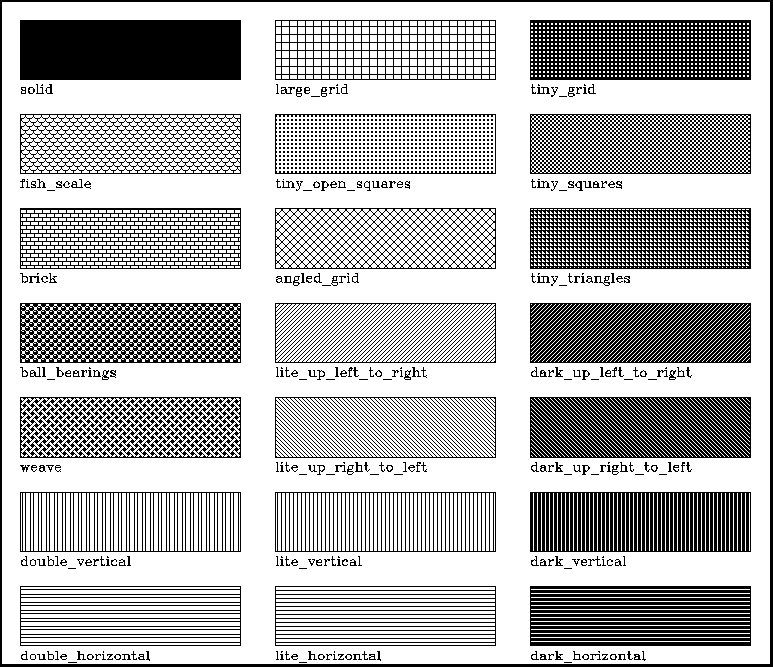
The argument is the name of a pattern file. Many patterns are included in the Ferret distribution. Try the Unix command "Fpattern '*'" to see a list of available pattern files, or run the script
yes? go show_all_patterns.jnl
to see examples of the different pattern fills available.
Ferret has the capability to make color plots using color only:
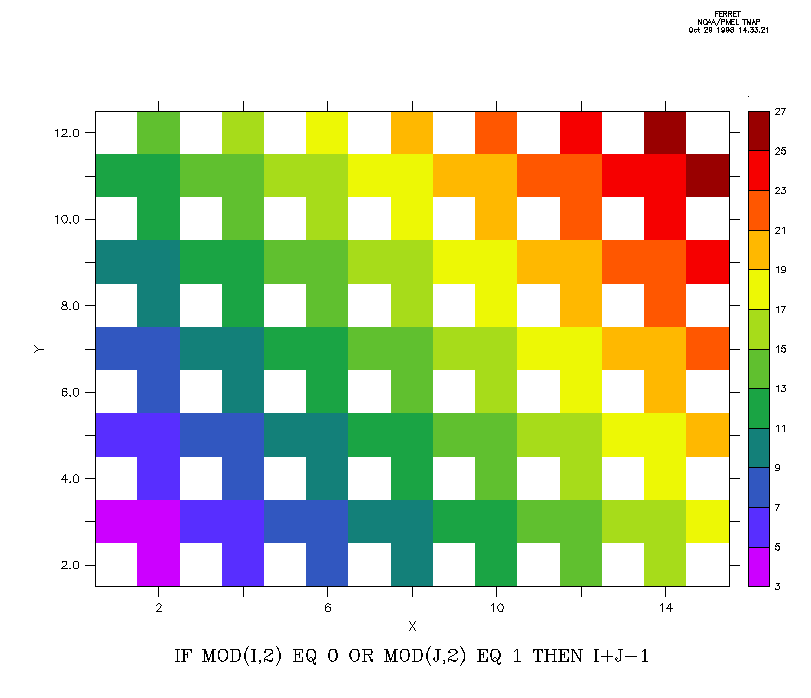
pr with colors laid on in patterns:
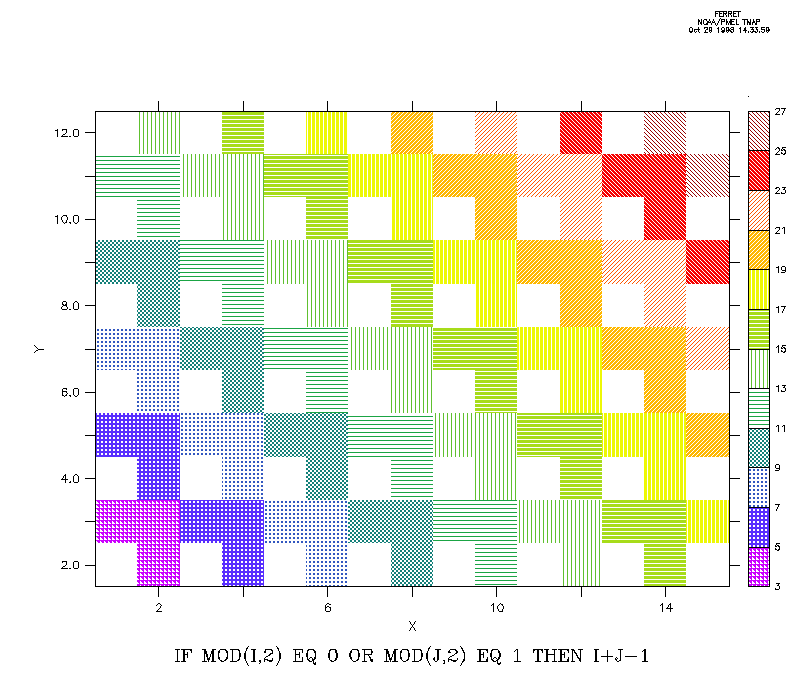
The script
yes? go pattern_demo
illustrates the use of patterns and overlaying patterns on color fill plots.
The PATTERN command sets the patterns to be used in a plot generated with the SHADE, FILL and POLYGON commands. It is similar to the PALETTE command, which sets colors, but the PALETTE and PATTERN commands act independently.When Ferret is started up, only one pattern is set, SOLID. The SOLID pattern is equivalent to not using any pattern, and SHADE, FILL and POLYGON fill their cells with solid color.
Pattern files end in the file suffix .pat, but use of the suffix is not necessary when specifying a pattern. Use GO show_pattern patt_name to display the patterns specified in a pattern file.
GO show_all_patterns draws a plot showing all the available pattern files and their names.
Notice that patterns can be used with a single color, or multiple colors, depending entirely on the PALETTE specification.
A pattern file may specify one or more patterns. If there are fewer patterns specified in a pattern file than there are levels in a particular plot, the patterns will be repeated.
NOTE: The Pattern capability is not available in PyFerret.
NOTE: The pattern capability depends on underlying graphicslibraries and is available only in interactive mode and metafile batchmode. It is not available in gif mode or batch postscript mode. Thatis, it can be used when Ferret is started in interactive or batchmetafiles modes, but not otherwise. To summarize,
> ferret
(Interactive mode: make hardcopy output by setting a metafile, or executing aFRAME/file=name.gif command to capture the screen image as a gif file.)> ferret -batch my_metafile.plt
> ferret -batch
(save hardcopy output by setting a metafile)> ferret -unmapped
(save hardcopy output by setting a metafile)
but Patterns are not available with these modes:
> ferret -gif
> ferret -batch my_psfile.ps
NOTE: The patterns make for nice-looking plots, but as they're not available for all plot outputs, here are some suggestions for other ways to mark a secondary region along with a color-fill plot:
1) Overlay contour lines for the same or another variable. Perhaps in some desired region of interest.
yes? use coads_climatology
yes? fill/l=7/y=40s:60n/x=100e:60w sst
yes? contour/over/l=7/lev=(0,5,0.5)/nolab wspd
yes? label/nouser -0.5,-0.7,-1,0,0.1, @CRContour: where wind speed less than 5 m/s
yes? go fland
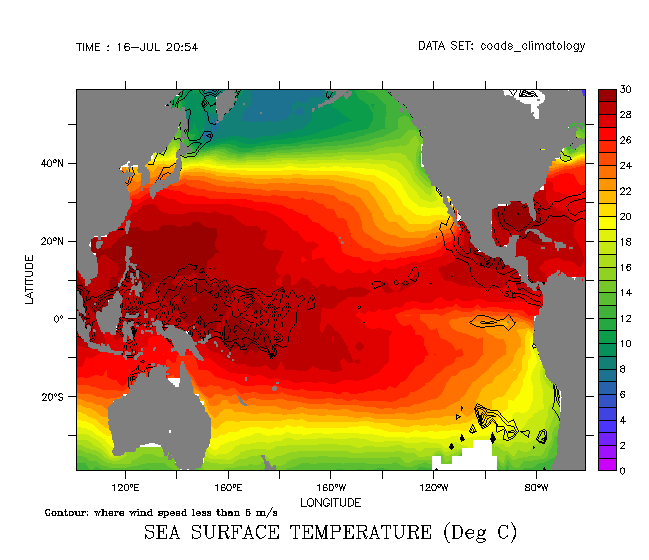
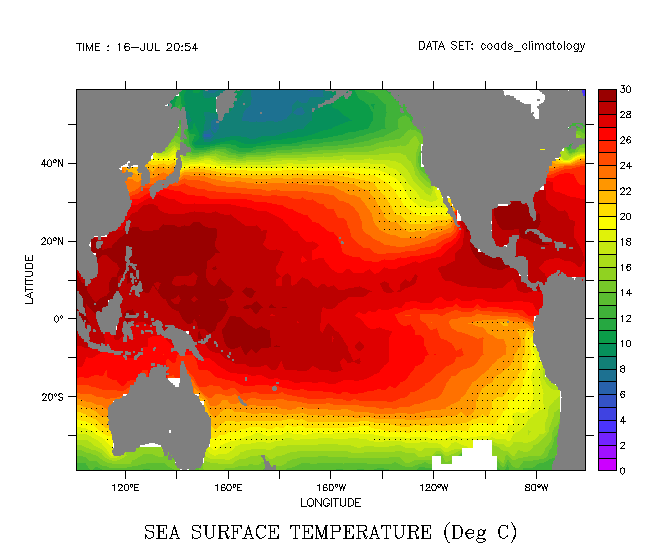
2) Dots or other symbols at a set of locations on the plot. This method has the second benefit of also letting us mark the grid on the plot:
yes? use coads_climatology
yes? fill/l=7/y=40s:60n/x=100e:60w sst

 ! Define a set of locations: Longitude value at each grid point,
 ! and latitude value at each grid point.

yes? let xpts = x[gx=sst]+0*y[gy=sst]yes? let ypts = 0*x[gx=sst]+y[gy=sst]

 ! We could mark the grid with:
 ! plot/vs/over/nolab/symbol=dot xpts, ypts

 ! Or define a mask which is 1 at some set of SST values of interest

yes? let sst_mask = IF sst gt 18 and sst lt 23 then 1
yes? plot/vs/over/nolabel/symbol=dot/L=7 xpts*sst_mask, ypts*sst_mask
yes? go fland
Again, the mask could be based on any expression, and the set of points may be any lists of values, e.g. from a finer or coarser grid.
If the data is on a curvilinear grid, then the curvilinear coordinate variables can be substituted for the xpts, ypts variables in an example such as the one above.
.