


Variables are of 2 kinds:
|
1) file variables |
(read from disk files or remote URLs) |
|
2) user-defined variables |
(defined by the user with LET command) |
Both types may be accessed identically in all commands and expressions.
Variables, regardless of kind, possess the following associated information:
- grid—the underlying coordinate structure
- units
- title
- title modifier (additional explanation of variable)
- flag value for missing data points
Use the commands SHOW DATA and SHOW VARIABLES to examine file variables and user-defined variables, respectively.
The pseudo-variables I, J, K, L, _M, _N, X, Y, Z, T, _E, _F and others may be used to refer to the underlying grid locations and characteristics and to create abstract variables.
For a description of string variables and arrays, see the chapter "Handling String Data".
Variables in Ferret are referred to by names with optional qualifying information appended in square brackets. See DEFINE VARIABLE for a discussion of legal variable names.
The information that may be included in the square brackets includes
D=data_set_name_or_number ! indicate the data set
G=grid_or_variable_name   ! request a regridding
X=,Y=,Z=,T=,I=,J=,K=,L=   ! specify region and transformation
                          e.g. LIST V[x=1:50:5,l=1:30@ave]
See the chapter "Grids and Regions", section "Regions" for more discussion of the syntax of region qualifiers and transformations.
Some examples of valid variable syntax are
Myvar ! data set and region as per current context

myvar[D=2]         ! myvar from data set number 2 (see SHOW DATA)
myvar[D=a_dset]    ! myvar from data set a_dset.cdf or a_dset.des
myvar[D=myfile.txt] ! myvar from file myfile.txt

myvar[G=gridname]  ! myvar regridded to grid gridname
myvar[G=var2]      ! myvar regridded to the grid of var2
                   ! which is in the same data set as myvar

myvar[G=var2[D=2]] ! myvar regridded to the grid of var2
                   ! which is in data set number 2
myvar[GX=axisname] ! myvar regridded to a dynamic grid which
                   ! has X axis axisname
myvar[GX=var2]     ! myvar regridded to a dynamic grid which
                   ! has the X axis of variable var2

myvar[I=1:31:5]    ! myvar subsampled at every 5th point
                   ! (regridded to a subsampled axis)
myvar[X=20E:50E:5] ! myvar subsampled at every 5 degrees
                   ! (regridded to a 5-deg axis by linear
                   ! interpolation)
File variables are stored in disk files or remote files (see OPeNDAP). Input data files can be ASCII, binary, netCDF, or TMAP-formatted (see the chapter "Data Set Basics"). File variables are made available with the SET DATA (alias USE) command.
In some netCDF files the variable names are not consistent with Ferret's rules for variable naming. They may be case-sensitive (for example, variables "v" and "V" defined in the same file), may be restricted names such as the Ferret pseudo-variable names I, J, K, L, _M, _N, X, Y, Z, T, _E, _F, XBOX, YBOX, ZBOX, TBOX, EBOX, or FBOX, or they may include "illegal" characters such as "+", "-", "%", blanks, etc. To access such variable names in Ferret, simply enclose the name in single quotes. For example,
yes? PLOT 'x'
yes? CONTOUR 'SST from MP/RF measurements'
By the same token when using Ferret to output into netCDF files that Ferret did not itself create, the results may not be entirely as expected. Case-sensitivity of names is one aspect of this. Since Ferret is (by default) case insensitive and netCDF files are case-sensitive writing into a "foreign" file may result in duplicated entities in the file which differ only in case. Starting with Ferret v6.0 you may specify
yes? CANCEL MODE upcase_output
and output to netCDF files will retain the original case of the variables and attribute names. Also see the documentation on SET ATTRIBUTE/OUTPUT for more about controlling which attributes are written to netCDF files.
Pseudo-variables are variables whose values are coordinates or coordinate information from a grid. Valid pseudo-variables are
|
X or _X |
I or _I |
XBOX |
XBOXLO |
XBOXHI |
|
Y or _Y |
J or _J |
YBOX |
YBOXHI |
YBOXHI |
|
Z or _Z |
K or _K |
ZBOX |
ZBOXLO |
ZBOXLO |
|
T or _T |
L or _L |
TBOX |
TBOXHI |
TBOXHI |
|
_E |
_M |
EBOX |
EBOXHI |
EBOXHI |
|
_F |
_N |
FBOX |
FBOXHI |
FBOXHI |
The pseudo-variables for the E and F axes (Ferret v6.8 and higher) are named only with _E, _F, _M, _N. This preserves the availability of E,F,M,N as ordinary variable names. For symmetry with the other dimensions, _X, _Y, _Z, _T, _I, _J, _K, and _L were added in v6.8 to refer to the X,Y,Z and T axes.
A grid box is a concept needed for some transformations along an axis; it is the length along an axis that belongs to a single grid point and functions as a weighting factor during integrations and averaging transformations.
The pseudo-variables I, J, K, L, _M, _N are subscripts; that is, they are a coordinate system for referring to grid locations in which the points along an axis are regarded as integers from 1 to the number of points on the axis. This is clear if you look at one of the sample data sets:
yes? USE levitus_climatology
yes? SHOW DATA
     currently SET data sets:
    1> /home/porter/tmap/ferret/linux/fer_dsets/data/levitus_climatology.cdf  (default)
 name     title                             I         J         K         L
 TEMP     TEMPERATURE                      1:360     1:180     1:20      ...
 SALT     SALINITY                         1:360     1:180     1:20      ...
We see that there are 20 points along the z-axis (1:20 under K), for example, and that the z-axis coordinate values range from 0 meters to 5000 meters. Pseudo-variables depend only on the underlying grid, and not on the variables (in this case, temperature and salt).
Examples: Pseudo-variables
yes? LIST/I=1:10 I
yes? LET xflux = u * xbox[G=u]

yes? list/E=1:12 _E
The most flexible way to use at the values of pseudo-variables is to define a new variable whose values are defined as the values of the pseudo-variable. Pseudo-variables are always associated with a grid or axis so specify the variable or the grid or axis of a variable. (If the peudo-variable is on the ABSTRACT axis as in LIST/I=1:10 I above, the variable or grid is not needed.)
yes? LET tt = t[GT=var]
yes? LET ii = i[GT=var]

yes? LET xx = x[gx=xaxis_name]
yes? let delx = xbox[G=u]

yes? let NN = _N[gf=var]
The index or coordinate axis value at a particular location or range would be
yes? LIST t[GT=var,t=1-jan-2001]
yes? LIST x[GX=var,x=100:114]

Or, use the variables defined above,

yes? LIST tt[t=1-jan-2001]
yes? LIST xx[x=100:114]
3.1.3.1 Grids and axes of pseudo-variables
The name of a pseudo-variable, alone, ("I", "T", "ZBOX", etc.) is not sufficient to determine the underlying axis of the pseudo-variable. The underlying axis may be specified explicitly, may be inherited from other variables used in the same expression, may be generated dynamically, or may be inherited from the current default grid. The following examples illustrate the possibilities:
TEMP + Y ! pseudo-variable Y inherits the y axis of variable TEMP
Y[G=TEMP] ! explicit: Y refers to the y axis of variable TEMP
Y[GY=axis_name] ! explicit: Y refers to axis axis_name
Y[Y=0:90:2] ! y axis is dynamically generated (See "dynamic axes">,
In the expression
LET A = X + Y
in which the definition provides no explicit coaching, nor are there other variables from which Y can inherit an axis, the axis of Y will be inherited from the current default grid. The current default grid is specified by the SET GRID command and may be queried at any time with the SHOW GRID command. SHOW GRID will respond with "Default grid for DEFINE VARIABLE is grid".
Note that when pseudo-variables are buried within a user variable definition they do not inherit from variables used in conjunction with the user variable. For example, contrast these expressions involving pseudo-variable Y
USE coads_climatology ! has variable SST
LET A = Y ! Y buried inside variable A (axis indeterminate)
LIST SST + A ! y axis inherited from current default grid
LIST SST + Y ! y axis inherited from grid of SST
LIST SST + A[G=SST] ! y axis inherited from grid of SST
Chapter 3, Section 1.4
New variables can be defined from existing variables and from abstract mathematical quantities (such as COS(latitude)) with command DEFINE VARIABLE (alias LET). The section later in this chapter, Defining New Variables expands on this capability.
See command DEFINE VARIABLE and command LET in the Commands Reference. Example 3 shows the use of masking, a useful concept in constructing variables.
Examples: User-defined variables
1) yes? LET/TITLE="Surface Relief x1000 (meters)" r1000=rose/1000
2) yes? LET/TITLE="Temperature Deviation" tdev=temp - temp[Z=@ave]
3) yes? LET a = IF (sst GT 20. AND sst LT 30.) THEN sst ELSE 20.
Ferret can be used to manipulate abstract mathematical quantities such as SIN(x) or EXP(k*t)—quantities that are independent of file variable values. Such quantities are referred to as abstract expressions.
Example: Abstract variables
Contour the function
COS(a*Y)/EXP(b*T) where a=0.25 and b=-0.02
over the range
Y=0:45 (degrees) and T=1:100 (hours)
with a resolution of 0.5 degree on the Y axis and 2 hours on the T axis.
Quick and dirty solution:
yes? CONTOUR COS(0.25*Y[Y=0:45:0.5])/EXP(-0.2*T[T=1:100:2])
Nicer (Figure 3_1); plot is documented with correct units and titles):
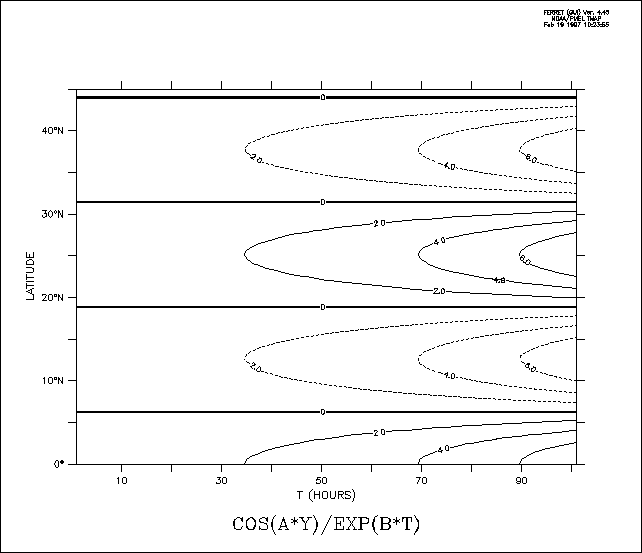
yes? DEFINE AXIS/Y=0:45:0.5/UNIT=DEGREES yax
yes? DEFINE AXIS/T=1:100:2/UNIT=HOURS tax
yes? DEFINE GRID/T=tax/Y=yax my_grid
yes? SET GRID my_grid
yes? LET a=0.25
yes? LET b=-0.02
yes? CONTOUR COS(a*Y)/EXP(b*T)
See the chapter "Grids and Regions", section "Grids", for more information on grids.
3.1.6 Missing value flags
Data values that are absent or undefined for mathematical reasons (e.g., 1/0) will be represented in Ferret with a missing value flag. In SHADE outputs a missing value flag embedded at some point in a variable will result in a transparent rectangular hole equal to the size of the grid cell of the missing value. In a CONTOUR or FILL plot it will result in a larger hole—extending past the grid box edge to the coordinate location of the next adjacent non-missing point—since contour lines cannot be interpolated between a missing value and its neighboring points. In the output of the LIST command for cases where the /FORMAT qualifier is not used the missing value will be represented by 4 dots ("...."). For cases where LIST/FORMAT=FORTRAN-format is used the numerical value of the missing value flag will be printed using the format provided.
3.1.6.1 Missing values in input files
Ferret does not impose a standard for missing value flags in input data sets; each variable in each data set may have its own distinct missing value flag(s). The flag(s) actually in use by a data set may be viewed with the SHOW DATA/VARIABLES command. If no missing value flag is specified for a data set Ferret will assume a default value of –1.E+34.
For EZ input data sets, either binary or ASCII, the missing data flag may be specified with the SET VARIABLE/BAD= command. A different value may be specified for each variable in the data set.
For netCDF input data sets the missing value flag(s) is indicated by the values of the attributes "missing_value" and "_FillValue." If both attributes are defined to have different values both will be recognized and used by Ferret as missing value indicators, however the occurrences of _FillValue will be replaced with the value of missing_value as the data are read into Ferret's memory cache so that only a single missing value flag is apparent inside of Ferret. The command SET VARIABLE/BAD= can also be applied to netCDF variables, thereby temporarily setting a user-imposed value for _FillValue. If there are values of NaN in the file, then NaN must be listed either as the "missing_value" OR "_FillValue" attribute and then NaN is the missing value. Or, the user may specify SET VARIABLE/BAD=NAN (case insensitive) to designate the Fortran value NaN (not a number) as the bad value flag for a given variable in a netCDF dataset.
Starting with Ferret V6.6.4, if there is no missing_value or _FillValue attribute for a variable in a netCDF file, Ferret assumes that the missing value flag is NaN. In addition, if the missing value flag is not NaN, Ferret sweeps through data read from netCDF or OPeNDAP datasets, and replaces any values of NaN with the missing-value flag. This lets Ferret accommodate many files which use NaN as an undocumented fill value.
3.1.6.2 Missing values in user-defined variables
User-defined variables may in general be defined as expressions involving multiple variables. The component variables need not in general agree in their choice of missing value flags. The result variable will inherit the bad value flag of the first variable in the expression. If the first component in the expression is a constant or a pseudo-variable, then Ferret imposes its default missing value flag of –1.E+34.
The function MISSING(variable,replacement) provides a limited control over the choice of missing values in user-defined variables. Note, however, that while the MISSING function will replace the missing values with other values it will not change the missing value flag. In other words, the replacement values will no longer be regarded as missing.
3.1.6.3 Missing values in output NetCDF files
Values flagged as missing inside Ferret will be faithfully transferred to output files—no substitution will occur as the data are written. In the case of netCDF output files both of the attributes missing_value, and _FillValue will be set equal to the missing value flag.
Under some circumstances it is desirable to save a user-defined variable in a netCDF file and then to redefine that variable and to append further output. (An example of this is the process of consolidating several files of input, say, moored measurements, into a gridded output.) The process of appending will not change any of the netCDF attributes—neither long_name (title), units, nor missing_value or _FillValue. If the subsequent variable definitions do not agree in their choice of missing value flags the resulting output may contain multiple missing value flags that will not be properly documented.
An easy "trick" that avoids this situation is to begin all of the variable definitions with an addition of zero, "LET var = 0 + ...." The addition of zero will not affect the value of the output but it will guarantee that a missing value flag of –1.E+34 will be consistently used. Of course, you will want to use the SET VARIABLE/TITLE= command in conjunction with this approach.
3.1.6.4 Displaying the missing value flag
If the LIST command is used, missing values are, by default, displayed as "...." To examine the flag as a numerical value, use LIST/FORMAT=(E) (or some other suitable format).
3.1.7 Returning properties of variables
The keyword RETURN= can reveal the size and shape, title, bad flag, units, and other properties of a variable or expression.
3.1.8 Variable and dataset attributes
Beginning with Ferret V6.0, Ferret has access to attributes of all variables, including netCDF variables, netCDF coordinate variables, user-defined variables and variables from non-netCDF datasets.. When a netCDF dataset is opened, its variables and attributes are stored. For other file variables and user variables, a basic set of attributes is created, including at least the missing_value flag, _FillValue, and a long-name attribute with the variable's definition. If a variable is defined with /UNITS or /TITLE then those are also included among the attributes.
The power of this feature is in its access to attribute information as strings or numeric data. The text or values can be examined, edited, and used in computations. The attributes of a variable can be changed, removed, and new attributes defined, and when writing netCDF files, we can control which attributes that are written to the file.
The general syntax for this access is
varname.attname
For example,
yes? USE coads_climatology
yes? LIST sst.units
          VARIABLE : SST.UNITS
          FILENAME : coads_climatology.cdf
          FILEPATH : /home/porter/tmap/ferret/linux/fer_dsets/data/
      "Deg C"
To refer to a coordinate variable, put the name of the coordinate variable in parentheses. The RETURN= keyword is helpful for getting the names of coordinate axes.
yes? LIST (coadsx).point_spacing
          VARIABLE : (COADSX).POINT_SPACING
          FILENAME : coads_climatology.cdf
          FILEPATH : /home/porter/tmap/ferret/linux/fer_dsets/data/
      "even"

yes? LIST (`sst,return=taxis`).time_origin
!-> list (TIME).time_origin
          VARIABLE : (TIME).TIME_ORIGIN
          FILENAME : coads_climatology.cdf
          FILEPATH : /home/porter/tmap/ferret/linux/fer_dsets/data/
     "1-JAN-0000 00:00:00"
The dataset itself can have attributes, the global attributes. To refer to the global attributes of the dataset, use a dot. The history attribute of the current dataset can be referred to by
..history
For example,
yes? LET a = 1; save/clobber/file=new.nc a
LISTing to file new.nc

yes? USE new.nc
yes? LIST ..history
          VARIABLE : ..HISTORY
          FILENAME : new.nc
     "FERRET V6 5-Jul-06"
When there is more than one dataset open, the dataset specifier [d=1] or [d=datasetname] comes at the end of the varname.attname string:
yes? use dataset_1
yes? use dataset_2
yes? list var.units[d=1]

yes? list ..history[d=dataset_1]
Examples with the global attributes:
A dot by itself refers to the set of global attributes, so "show attribute ." lists all of the global attributes
yes? use "http://ferret.pmel.noaa.gov/pmel/thredds/dodsC/data/PMEL/WOA05nc/seasonal/A1316dd1.nc"
yes? show attribute .
     attributes for dataset: http://ferret.pmel.noaa.gov/pmel/thredds/dodsC/data/PMEL/WOA05nc/seasonal/A1316dd1.nc
 ..title = World Ocean Atlas 2005
 ..institution = CSIRO (CSIRO Marine and Atmospheric Research, Melbourne, Australia) and NODC
(National Oceanographic Data Center, Silver Springs, MD, U.S.A.)
 ..source = ocean: WOA05 (1.0x1.0L33)
 ..project_id = Climate, Weather & Ocean Prediction - Climate Applications & Prediction of Oceans & Weather.
 ..experiment_id = climate of the 20th Century experiment (20C3M)
 ..realization = 1
 ..Conventions = CF-1.0
 ..references = World Ocean Atlas 2005. Documentation accompanying WOA05 DVD (ASCII text and portable document format).
 ..history = Tcl version: 8.4.13, NAP version: 6.2.2
 ..table_id = Table O1e
SET ATTRIBUTE/OUTPUT requests that attributes are written out. To write all the global attributes to a netCDF file, issue the command
yes? set att/output=all .
will write all of the global attributes for the dataset from which the output variable comes. The global attributes are written only when the dataset is created.
yes? set att/output=all
yes? let myvar = invar[d=1,x=@ave,y=@ave]
yes? save/clobber/file=out.nc myvar
To write a global attribute to a netCDF file, define the attribute as a numeric or string variable and use SAVE/ASGLOBAL (available in Ferret/PyFerret v7.3). To redefine an attribute, define a variable with an existing global attribute name and the desired value(s), and use SAVE/APPEND/ASGLOBAL. This will overwrite any existing contents.
SAVE/ASGLOBAL can be used only for single-valued strings (not arrays of strings), or for 1-dimensional numeric variables. It will issue an error otherwise.
yes? cancel mode upcase ! a useful setting

yes? let project_notes = "Version 3 of the protocol"
yes? save/append/file=out.nc/ASGLOBAL project_notes

! To edit the attribute that was just added,
yes? let project_notes = "Version 3 and settings defined in document x"
yes? save/append/file=out.nc/ASGLOBAL project_notes
Note too the NCO functions which call NCO utilities from within Ferret: NCO and NCO_ATTR
Chapter 3, Section 1.8.1
SHOW ATTRIBUTE commands
|
SHOW DATA/ATTRIBUTE |
Expands the SHOW DATA output, listing dataset attributes and variable attributes |
|
SHOW ATTRIBUTE varname.attname |
Lists the value(s) of an attribute. It gives the same information as LIST varname.attname |
|
SHOW ATTRIBUTE/ALL varname |
Lists all of the attributes for the variable |
|
`varname.attname,RETURN=size` |
Returns the length of a string attribute, or the number of values in a numeric attribute |
Example:
yes? USE etopo60
yes? SHOW DATA/ATT      currently SET data sets:
    1> /home/porter/tmap/ferret/linux/fer_dsets/data/etopo60.cdf  (default)
 VARIABLE               ATTRIBUTE NAME      TYPE    SIZE OUTFLAG VALUE
--------------------------------------------------------------------------------

 .                      history             CHAR    28   T      FERRET V4.45  22-May-97

(ETOPO60X)              units               CHAR    12   T      degrees_east
                        modulo              CHAR    1    T
                        point_spacing       CHAR    4    T      even
                        orig_file_axname    CHAR    8    F      ETOPO60X

(ETOPO60Y)              units               CHAR    13   T      degrees_north
                        point_spacing       CHAR    4    T      even
                        orig_file_axname    CHAR    8    F      ETOPO60Y

 ROSE                   missing_value       FLOAT   1    T      -1.000000E+34
                        _FillValue          FLOAT   1    T      -1.000000E+34
                        long_name           CHAR    34   T      RELIEF OF THE SURFACE OF THE EARTH
                        history             CHAR    12   T      From etopo60
                        units               CHAR    6    T      METERS
In addition to the attributes of variables we can also learn about the number and names of variables in a dataset, the dimensions and number of attributes for each variable, and the same information about the dimensions. Note that dimensions may exist in NetCDF datasets without a corresponding coordinate variable - these define the size of the dimension which is treated as a simple list, index 1, 2, 3. These keywords are available:
|
DATASET |
|
|
..nvars |
Number of variables (excluding coordinate variables) |
|
..varnames |
Variable names (excluding coordinate variables) |
|
..ndims |
Number of dimensions |
|
..dimnames |
Dimension names |
|
..ncoordvars |
Number of coordinate variables |
|
..coordnames |
Coordinate variable names |
|
..nattrs |
Number of global attributes |
|
..attnames |
Global attribute names |
|
VARIABLE |
|
|
var.ndims |
Number of dimensions for variable |
|
var.dimnames |
Names of variable's dimensions |
|
var.nattrs |
number of attributes for variable |
|
var.attnames |
Attribute names for variable |
Note that many files have the same set of dimension names and coordinate variable names. However, it is possible for files to have dimensions without a corresponding coordinate variable. When Ferret encounters a file with a dimension but without a coordinate variable, it defines a simple indexed axis, with values 1, 2, 3 to use as a coordinate axis.
Examples:
yes? use mydata.nc
yes? let names = ..varnames
yes? list names
yes? let anames = `names[i=2]`.attname
yes? list ..ndims
yes? list myvar.dimhnames

! to get the information from a dataset other than the current default one, put a dataset specifier last.

yes? let names1 = ..varnames[d=1]
yes? list names1
3.1.8.3 Programmatic access to attributes
To form a variable from attribute information simply use a LET command:
yes? let a = varname.missing_value
yes? let b = (axisname).units
yes? let h = ..history
Or, use attribute keywords
! The number of variables (not including coordinate variables)
yes? let nv = ..nvars

! The number of coordinate variables
yes? let nc = ..ndims

! A variable with a list of all coordinate variables
! from data set 1
yes? let lnames = ..dimnames[d=1]

! If two datasets have a variable TEMP, list the units
! of the variable in each dataset
yes? let uu = temp.units
yes? list/d=1 uu
yes? list/d=2 uu
3.1.8.4 Editing attributes
We can change an existing attribute for a variable, add new attributes, and control which are written to output netCDF files. We can define attributes to be of type STRING or FLOAT. (On ouput we will be able to request type conversions to other numeric types). Numeric attributes may be lists of values. If the type is note specified by the /TYPE qualifier, the type is inferred from the value of the attribute. The output flag is set with the /OUTPUT qualifier: SET ATTRIBUTE/OUTPUT varname.attname marks the attribute for output to netCDF files, and CANCEL ATTRIBUTE/OUTPUT causes that attribute to be hidden on output. When defining new attributes, they are marked for output by default.
Example: add new attributes with DEFINE ATTRIBUTE
yes? USE etopo60
yes? DEFINE ATT/TYPE=float rose.floatval = 22
yes? DEFINE ATT rose.pp = {1.5, 1.9}
yes? DEFINE ATT/TYPE=string rose.strval = 2
yes? DEFINE ATT rose.some_text = "some text about ROSE "
yes? SHOW ATT/ALL rose
   attributes for dataset: /home/porter/tmap/ferret/linux/fer_dsets/data/etopo60.cdf
 ROSE.missing_value = -1.000000E+34
 ROSE._FillValue = -1.000000E+34
 ROSE.long_name = RELIEF OF THE SURFACE OF THE EARTH
 ROSE.history = From etopo60
 ROSE.units = METERS
 ROSE.floatval = 22
 ROSE.pp = 1.5, 1.9
 ROSE.strval = 2
 ROSE.some_text = some text about the ROSE variable

! /D= specifies the dataset if needed
yes? DEFINE ATT/D=1 rose.another_attribute = 6

! /OUTPUT sets the output flag: this attribute will be
! written to output files with the variable.
yes? DEFINE ATT/OUTPUT rose.more_text = "Another notation"
As noted above . without a variable name refers to the global attributes. When a file variable is written to a new netCDF file, any global attributes from that file that are marked with /OUTPUT will be written.
! Mark these global attributes for writing

yes? set attribute/output ..source
yes? set attribute/output ..institution
or write them all. This will apply only on a new file
! Mark all of the global attributes for writing
yes? set data 1
yes? set attribute/output .
yes? save/clobber/file=my_output_file.nc variable[d=1]
We can also change an existing attribute. As in the commands DEFINE VARIABLE; SET VARIABLE; CANCEL VARIABLE we can use DEFINE ATTRIBUTE to redefine an existing attribute or SET ATTRIBUTE and CANCEL ATTRIBUTE to change settings or values of an attribute.
Examples: continuing the above example
! Change the text in long_name
yes? DEFINE ATT rose.long_name = "Relief of the Surface of the Earth"

! The rose.history attribute will NOT be written to output files
yes? CANCEL ATT/OUTPUT rose.history

! The new attribute rose.pp we defined above WILL be written
yes? SET ATT/OUTPUT rose.pp
For a coordinate variable, SET AXIS and SET ATTRIBUTE commands do the same thing:
yes? USE levitus_climatology

! These commands are equivalent
yes? SET AXIS/POSITIVE="up" `temp,return=zaxis`
yes? SET ATT (`temp,return=zaxis`).positive = "up"
Another way to edit attributes is to inherit them from another variable. Use the qualifer SET ATTRIBUTE/LIKE=
Example (note the long_name and units)
yes? use levitus_climatology
yes? SET ATT/LIKE=salt temp
yes? SHOW ATTRIBUTE/ALL temp
attributes for dataset: /home/porter/tmap/ferret/linux/fer_dsets/data/levitus_climatology.cdf
 TEMP.missing_value = -1.E+10
 TEMP._FillValue = -1.E+10
 TEMP.long_name = SALINITY
 TEMP.history = From levitus_climatology
 TEMP.units = PPT
As noted at the start of this section, the attribute commands can be applied to any variable, not just those in netCDF datsets. A user variable has a few default attributes when it is defined; a missing_value, _FillValue, and a long_name, and units if they are included in the definition. In the following example, a user variable inherits all of the attributes from a file variable.
Here salt2 initially has only a long-name, missing_value, and _FillValue.
yes? USE levitus_climatology
yes? LET salt2 = 2* salt
yes? SHOW ATT/ALL salt2
    attributes for user-defined variables
SALT2.long_name = 2* SALT
SALT2.missing_value = -1.000000E+34
We can inherit the units and a more descriptive long_name from the dataset variable.
yes? SET ATT/LIKE=salt salt2
yes? SHOW ATT/ALL salt2
    attributes for user-defined variables
 SALT2.missing_value = -1.E+10
 SALT2._FillValue = -1.E+10
 SALT2.long_name = SALINITY
 SALT2.history = From levitus_climatology
 SALT2.units = PPT
Finally, fix the long_name of our new variable
yes? set att salt2.long_name = "2 * `salt.long_name`"
!-> set att salt2.long_name = "2 * SALINITY"
*** NOTE: Changing the value of attribute
3.1.8.5 Output attributes to NetCDF files
As noted in the previous section, the value of the attribute output flag, set by the commands DEFINE ATTRIBUTE/OUTPUT, SET ATTRIBUTE/OUTPUT and CANCEL ATTRIBUTE/OUTPUT controls whether an attribute is written to a netCDF file when the variable is written. The SET ATTRIBUTE/OUTPUT= allows more precise control over the writing of attributes.
|
SET ATT/OUTPUT varname.attname |
Sets an individual attribute to be written when the variable is written |
|
SET ATT/OUTPUT=all varname |
Output all attributes that have been defined for a variable |
|
SET ATT/OUTPUT=default varname |
Write only the outputs that Ferret typically writes by default (see reference) |
|
SET ATT/OUTPUT=none varname |
Output no attributes for the variable |
|
CANCEL ATT/OUTPUT varname.attname |
Suppresses output of the attribute when the variable is written. |
Example:
yes? LET aa = 12.
yes? LET bb = {3,4.5,6,7,4}

yes? DEFINE ATT/OUTPUT att bb.my_title = "This is my new variable bb
yes? DEFINE ATT bb.another_attr = 6

! Output just bb.mytitle, along with the default
! ones, missing_value, _FillValue, and long_name.
yes? SAVE/CLOBBER/FILE=ab.nc aa,bb

! Output all attributes
yes? SET ATT/OUTPUT=all bb
yes? SAVE/CLOBBER/FILE=ab.nc aa,bb

! Output default attributes
yes? SET ATT/OUTPUT=default bb
yes? SAVE/CLOBBER/FILE=ab.nc aa,bb
We can suppress output of an attribute that Ferret would otherwise add, the "axis" attribute for coordinate axes.
yes? USE levitus_climatology
yes? CANCEL ATT/OUT (`temp,return=xaxis`).axis
3.1.8.6 Output Variables to NetCDF files
The attribute-handling structure gives us flexibility in writing variables to netCDF files. We can specify that the upper- or lower-case spelling of variables and attributes from an input netCDF file be preserved on output, or that these should be upper-cased as has been done previously in Ferret. By default, Ferret still up-cases variable names when it writes variables to netCDF files. If we want to keep the case of the names that they had on input, use
CANCEL MODE upcase_output
We can also control the data type of variables written to output netCDF files, with SET VAR/OUTTYPE=]. The netCDF library is used to convert the data type of a Ferret FLOAT value to the requested output type. The types allowed are DOUBLE, FLOAT, INT, SHORT, and BYTE, or INPUT to preserve the type the data had on input. To write integers, for instance,
yes? SET DATA etopo60
yes? SET VAR/OUTTYPE=int4 rose
yes? SAVE/X=180/FILE=r_int.nc rose
LISTing to file a.nc

*** NOTE: Converting data type of missing_value NC_FLOAT to match output type of variable NC_INT
** netCDF error:
data in attribute missing_value not representable in output type NC_INT
Here, the missing_value of the variable cannot be represented as an integer, and the file was not written. Correct for this by assigning a new missing_value to the variable before writing:
yes? SET DATA etopo60
yes? SET VAR/OUTTYPE=int4/BAD=200000 rose
yes? SAVE/X=180/FILE=r_int.nc rose
   LISTing to file a.nc
*** NOTE: Converting data type of missing_value NC_FLOAT to match output type of variable NC_INT
Note that not all data can be represented in all types. In Ferret v6.8, Ferret lists data to netCDF files in double precision unless "SET VAR/OUTTYPE" is used to change the data type. [Prior to Ferret v6.8, When data was written to DOUBLE, it is always converted from the Ferret internal representation of single precision FLOAT data, even if the original data was double precision.]
3.1.8.7 Packed data in NetCDF files
Packing data: This mechanism lets us pack data when writing it to a netCDF file by using the add_offset and scale_factor attributes. Say a dataset has a variable called elev which is packed using these attributes. By default Ferret scales this data when it is read, and rescales it when writing to a netCDF file. To control this process it, we can turn off the use of the scale_factor and add_offset attributes. Then Ferret will apply this scaling to data and its missing_value and _FillValue are rescaled on output.
By default the scale_factor and add_offset attributes are applied to a file variable on writing it. To write un-scaled data:
yes? USE my_scaled_dset.nc
yes? CANCEL ATT/OUTPUT elev.scale_factor
yes? CANCEL ATT/OUTPUT elev.add_offset

yes? SAVE/CLOBBER/FILE=scaled.nc/J=1 elev
Note that Ferret will also write the data from any file variable using the original data type of that variable in the file. Often packed data is written in a data type such as SHORT integers, and writing it un-packed will result in an error such as
NetCDF: Numeric conversion not representable (OPeNDAP/netCDF Error code -60)
 data in attribute missing_value not representable in output type NC_SHORT
You could redefine the data so it's missing-value flag can be represented with the original data type, but often you want to write the data with a FLOAT or DOUBLE data type:
yes? SAVE/CLOBBER/OUTTYPE=FLOAT/FILE=scaled.nc/J=1 elev
We can use DEFINE ATTRIBUTE/OUTPUT commands to apply new scale factors to a variable or define scale and offset attributes when writing any variable. See the discussion at the end of the section on DEFINE ATTRIBUTE about defining these special attributes.
Note that if coordinate data is packed in a file being read by Ferret, then starting with Ferret v6.3, Ferret unpacks the coordinate data (applies the scale and offset as the coordinates are read in), so that the file can be used. However, re-packing of coordinate data on writing netCDF output is NOT implemented, as there are issues with the accuracy of double-precision coordinates when scaling is applied. For instance, if the NCO operator ncpdq -P all_xst is applied to a file, all variables including coordinate variables are packed. When the coordinates are unpacked by Ferret (or by the NCO unpacking command ncpdq -P upk), the coordinate values have changed relative to their original unpacked values, often in the 5th or 6th decimal position. For graphics or some other calculations this may not be important. But it causes the internal checks that Ferret does when writing coordinates to a file to fail, and so Ferret does not allow packing or rescaling of coordinate values via a Ferret SAVE command. An informational message will be given to the user and the unpacked coordinates are written to the file.