


Ref Sec31.
SET
Sets features of the operating environment for program Ferret.
Generally, features may be toggled on and off with SET and CANCEL. Features affected by SET may be examined with SHOW (See also CANCEL, and SHOW).
Ref Sec31.1.
/TYPE /OUTPUT /LIKE
Set or reset attribute characteristics for a variable and/or attribute. (See the section on access to dataset and variable attributes)
SET ATTRIBUTE/ TYPE=[float or string] varname.attname
To work with global attributes use "." instead of "varname"
yes? SET ATTRIBUTE/TYPE=float varname.attname
yes? SET ATTRIBUTE/LIKE=file_var my_var
yes? SET ATTRIBUTE/OUTPUT=all taux
yes? SET ATTRIBUTE/OUTPUT ..project
yes? SET ATTRIBUTE/OUTPUT=all .
SET ATTRIBUTE/OUTPUT= varname[.attname] sets a flag for each attribute which determines whether it is written to output netCDF files. It can turn on writing of all or none of the attributes, or /OUTPUT=default gives the standard set of Ferret output attributes. It is applied as follows.
|
SET ATT/OUTPUT varname.attname |
Sets an individual attribute to be written when the variable is written |
|
SET ATT/OUTPUT=all varname |
Write all attributes that have been defined for a variable, or if . is |
|
SET ATT/OUTPUT=default varname |
Write only the outputs that Ferret typically writes by default |
|
SET ATT/OUTPUT=none varname |
Output no attributes for the variable |
This causes all of the attributes from var2 to be copied to var1, removing all of the attributes of var1, and replacing them with the attributes and the output flags from var2.
See also the command LET/LIKE= var2 var1 for a more straightforward means of doing this.
To create new attributes for variables or new global attributes, use DEFINE ATTRIBUTE
Ref Sec31.2.
/MODULO /DEPTH /CALENDAR /T0 /UNITS /STRIDE /OFFSET /REGULAR
Set or resets characteristics of an existing axis.
Indicates that an axis is to be treated as a depth axis (graphics made with positive down).
yes? SET AXIS/DEPTH z_ax
Resets the calendar definition for a time axis.The allowed calendars are GREGORIAN, NOLEAP, JULIAN, 360_DAY, and ALL_LEAP. This qualifier is ignored if it is applied to a non-time axis. Applying this qualifier does not change the coordinates of the axis, but only their interpretation. For example, create an axis which is by default a Gregorian calendar axis, containing a leap day. Then reset it to a NOLEAP calendar. The coordinate values are the same but their interpretation as dates is changed.
yes? DEFINE AXIS/T=0:100:1/T0="1-JAN-2004 00:00:00"/UNITS=days tax
yes? LIST/L=58:62 T[GT=tax]
VARIABLE : T
axis TAX
SUBSET : 5 points (TIME)
27-FEB-2004 00 / 58: 57.00
28-FEB-2004 00 / 59: 58.00
29-FEB-2004 00 / 60: 59.00
01-MAR-2004 00 / 61: 60.00
02-MAR-2004 00 / 62: 61.00

yes? SET AXIS/CALENDAR=noleap tax
yes? LIST/L=58:62 T[GT=tax]
VARIABLE : T
axis TAX
SUBSET : 5 points (TIME)
CALENDAR : NOLEAP
27-FEB-2004 00 / 58: 57.00
28-FEB-2004 00 / 59: 58.00
01-MAR-2004 00 / 60: 59.00
02-MAR-2004 00 / 61: 60.00
03-MAR-2004 00 / 62: 61.00
Indicates that an axis is to be treated as a modulo axis (the first point "wraps" and follows the last point, as in a longitude axis). The optional modulo length is the length in axis units of the modulo repeat. If a length is specified, it may be longer than the axis span, so that the axis is treated as a subspan modulo axis. If it is not specified, the axis length is used as the modulo length. See the sections on modulo axes and subspan modulo axes for more information.
yes? SET AXIS/MODULO x_ax
yes? SET AXIS/MODULO/len=365.2425 days_axis
Indicates that an axis is to be treated as a regularly-spaced axis. Axes may have been saved to a netCDF file in such a way that they appear to be irregular but in fact should be treated as regularly-spaced. (See also SET DATA/REGULART)
yes? SET AXIS/REGULAR x_ax
 or
yes? SET AXIS/REGULAR `sst,RETURN=taxis`
/STRIDE=
Indicates that the axis is to be treated everywhere it is used, with the stride specified. The stride value directs Ferret to use every nth point along the axis. If variables and grids from different data sets have this exact same axis, then the striding is applied for all those variables and grids. The striding may be cancelled with CANCEL AXIS/STRIDE. See the discussion of netCDF strides.
This qualifier is valid only if /STRIDE= is also specified. Otherwise it is ignored. The value of the offset the delta from the first index value, so that /OFFSET=0 means start at index=1, and
yes? SET AXIS/STRIDE=5/OFFSET=2 my_x_axis
is equivalent to this old stride syntax
yes? LET new_var = old_var[i=3:1000:5]
The stride syntax var[i=start:end:delta] is also still valid.
Example:
! Open a dataset with the time axis representing monthly data starting in January
! Set strides so that we pick out every December.

yes? use my_monthly_data
yes? SET AXIS/STRIDE=12/OFFSET=11 `var,RETURN=taxis`
yes? LIST/L=1:10 var
             VARIABLE : SST[X=300:330@AVE,Y=10:20@AVE]
             DATA SET : COADS 2x2 Degree Monthly Average Surface Marine Observations
             FILENAME : coads.cdf
             FILEPATH : /home/shiva/data/
             SUBSET   : 10 points (TIME)
             LONGITUDE: 60W to 30W
             LATITUDE : 10N to 20N
 DEC-1946 /  1:  26.73
 DEC-1947 /  2:  26.06
 DEC-1948 /  3:  26.13
 DEC-1949 /  4:  26.26
 DEC-1950 /  5:  26.62
 DEC-1951 /  6:  26.30
 DEC-1952 /  7:  26.85
 DEC-1953 /  8:  26.53
 DEC-1954 /  9:  25.58
 DEC-1955 / 10:  26.64
Sets, or resets, the time origin of a time axis, in the T or the F direction
yes? SET AXIS/T0="1-JAN-1990" t_ax
yes? SET AXIS/T0="15-MAR-1950 12:00:00" timeax

yes? SET AXIS/T0=1-jan-2001 f4axis
If the axis is not a time or forecast-time axis, this qualifier is ignored. Applying this qualifier does not change the coordinates of the axis, but only their interpretation. If /T0 is applied to an axis that did not previously have a time origin, the axis will become a calendar-formatted axis, with time coordinates automatically translated into date/time strings on listings, and formatted time axes on plots.
Sets, or resets, the units of an axis.
yes? SET AXIS/UNITS=days t_ax
yes? SET AXIS/UNITS=meters xax
Applying this qualifier does not change the coordinates of the axis, but only their interpretation. UNITS are expressed as a string and are converted according to the usual rules for Ferret axes, see the description of units under DEFINE AXIS
Ref Sec31.3.
SET DATA
/EZ /VARIABLE /TITLE /FORMAT /GRID /SKIP /COLUMNS /SAVE /RESTORE /ORDER /TYPE /SWAP /REGULART /DELIMITED /FEATURE /FMASK
Specifies ASCII, binary, netCDF, GT, or TS-formatted data set(s) to be analyzed. The relevant qualifiers are
SET DATA/EZ /COLUMNS /FORMAT /GRID /SKIP /TITLE /VARIABLE /TYPE /DELIMITED
1) ASCII or binary:
yes? SET DATA/EZ[/qualifiers] data_set1, data_set2, …
or equivalently, with alias FILE:
yes? FILE[/qualifiers] data_set1, data_set2, ...
2) netCDF:
Initialize a netCDF file, or any file accessed through netCDF alls. OPeNDAP file, descriptor file or aggregation. The relevant qualifiers are
/FORMAT /TITLE/ ORDER/ REGULART /FEATURE /FMASK
yes? SET DATA/FORMAT=cdf netCDF_file
or equivalently, with alias USE. USE applies to files of the following types:
NetCDF files, including their path if needed,
yes? USE netCDF_file1.nc, netCDF_file2.cdf
or for an OPeNDAP dataset,
yes? use "http://ferret.pmel.noaa.gov/pmel/thredds/dodsC/data/PMEL/coads_climatology.nc"
or a multi-file dataset or aggregation:
yes? use my_descriptor.des

yes? use my_definition.agg
Qualifiers specific to USE (SET DATA/FORM=cdf) are listed below.
3) GT or TS-formatted (obsolete)
yes? SET DATA data_set1, data_set2, ...
In the case of GT or TS-formatted files, an extension of .des is assumed. A previously SET data set can be SET by its reference number, as shown by SHOW DATA, rather than by name.
Note: Maximum simultaneous data sets that may be open at once is limited to 100. Use CANCEL DATA if the limit is reached.
Command qualifiers for SET DATA_SET:
SET DATA/FORMAT=
Specifies the format of the data set(s) being SET. Allowable values for "file_format" are "cdf", "delimited", "free", "stream", "unformatted", or a FORTRAN format in quotation marks and parentheses.
yes? SET DATA/FORMAT=file_format [data_set_name_or_number]
Valid arguments for /FORMAT=
1) SET DATA/FORMAT=free (default for SET DATA/EZ)
To use the format "free" a file must consist entirely of numerical data separated by commas, blanks or tabs.
2) SET DATA/FORMAT=cdf
If SET DATA/FORMAT=cdf (alias USE) is used, the data file must be in CDF format. The default filename extension is ".cdf", or ".nc"
3) SET DATA/FORMAT=descriptor
Will open the dataset as a descriptor file. The extension must be included in the file name. USE/FORMAT=descriptor is also valid. If the file extension is .des or .mc then the file will be recognized as a descriptor file without the /FORMAT qualifier. (.mc is recognized only in Ferret v6.85 and higher).
Example:
yes? SET DATA/FORMAT=CDF my_netcdf
or equivalently,
yes? USE my_netcdf
See the chapter "Data Set Basics", section "NetCDF data."
Command qualifiers for SET DATA_SET/FORMAT=CDF:
SET DATA /FORMAT=CDF /ORDER=<permutation> /REGULART
The permutation argument contains information both about the order of the axes in the file and the direction.
The order indicated through the /ORDER qualifier should always be exactly the reverse of the order in which the dimensions of variables as revealed by the netCDF ncdump -h command are declared. (This ambiguity reflects the linguistic difference between "C ordering" and "FORTRAN ordering". The default X-Y-Z-T ordering used in the COARDS standard and in Ferret documentation would be referred to as T-Z-Y-X ordering if we used C terminology.)
Thus, to USE a file in Ferret in which the data on disk transposes the X and Y axes we would specify
USE/ORDER=YX my_file.nc
To use a file in which the data were laid down in XZ "slabs", such as might occur in model outpus we would specify
USE/ORDER=XZYT my_model.nc
To indicate that the coordinates along a particular axis are reversed from the "right hand rule" ordering, for example a Y axis which runs north to south (not uncommon in image data), we would precede that axis by a minus sign. For example
USE/ORDER=X-Y my_flipped_images.nc
The minus sign should be applied to the axis position **after** transposition. Thus if a file both transposed the XY axis ordering and used north-to-south ordering in latitude one would access the file with
USE/ORDER=Y-X my_transposed_flipped_images.nc
NetCDF files, while in principle self-documenting, may be contain axis ambiguities. For example, a file which is supposed to contain a time series, but lacks units on the coordinate variable in the file may appear to be a line of data on the X axis. The /ORDER qualifier can be used to resolve these ambiguities. For this example, one would initialize the file with the command
USE/ORDER=T my_ambiguous_time_series.nc
Notes for USE/ORDER:
a) Note that specifying USE/ORDER=XYZT is not always equivalent to specifying default ordering. For example, if a netCDF file contained variables on an XYT grid, the /ORDER=XYZT specifaction would tell Ferret to interpret it as an XYZ grid.
b) Also note, the /ORDER qualifier will be ignored if either the file is not netCDF, or the file is netCDF but has an "enhanced" header (see SAVE/HEADING=enhanced)
Speeds initialization of large netCDF data sets with known regular time axes. When Ferret initializes a netCDF file (the SET DATA/FORMAT=cdf command or the USE command alias), it checks for the attribute point_spacing = "even" on the time axis. If found, Ferret knows that the coordinates are evenly spaced and reads only the first and last coordinate on the axis to obtain a complete description. If not found, Ferret must read the full list of coordinates -- a time-consuming procedure for very large files. After reading the coordinates, Ferret determines if they are regular. The /REGULART qualifier instructs Ferret to treat the time axis as regular regardless of the presence or absence of a point_spacing attribute in the file, speeding up the initialization time on files lacking point_spacing, but known to be regular. If the file happens to contain a bounds attribute on the time axis, and /REGULART is specified, then the bounds are ignored.
When the point_spacing attribute is found, (starting with Ferret v7.5) Ferret will do some checking on the spacing. It compares the size of the first delta-coordinate with (last-first)/npoints. If the coordinates are really not regularly spaced, within the precision of the data-type of coordinates in the dataset, then it'll issue a warning and go ahead and read all of the coordinates, treating the axis as an irregular axis.
Note that when writing netCDF files Ferret, by default, does NOT include the point_spacing attribute. This is because Ferret's default file characteristic is to be append-able, with no guarantees that the appended time steps will be regularly spaced. For output files of fixed length with regular time steps it is advisable to use the SAVE/RIGID qualifier. This allows Ferret to include the point_spacing="even" attribute. If the files will be very large (too large for the full time range to be in memory), then use the /RIGID/TLIMITS= qualifiers to specify the full, ultimate fixed size and use SAVE/APPEND to insert data into the file piecemeal.
If the file has the bounds attribute for the record axis (files written with Ferret version 5.70 and after include the bounds attribute for all irregular axes), then we can append further timesteps to the file and keep the correct point spacing. If there is a gap between the last time in the existing file and the first time being appended, Ferret adds a void point, consisting of missing data, centered on the interval between the upper cell bound of the time axis in the file and the lower cell bound of the new data being written.
SET DATA/FORMAT=cdf/STRICT
Ferret reads and checks the coordinate data when a dataset is initialized. Coordinates must be strictly increasing. If coordinates are repeated, Ferret will attempt to create a strictly-increasing axis by "midro-adjusting" the coordinates.
yes? use repeat_t_coord.nc
           *** NOTE: Axis has repeated values -- micro-adjusting TMIN
To avoid this adjustment, specify USE/STRICT.
yes? cancel data/all
yes? use/STRICT repeat_t_coord.ncyes? use/strict repeat_t_coord.nc
           *** NOTE: Coordinates out of order or missing on axis TMIN at subscript 4
           *** NOTE: A dummy axis of subscripts will be used
SET DATA/FORMAT=cdf/FEATURE=
For data files that follow the CF standard for Discrete Sampling Geometries (DSG) using contiguous ragged array form, Ferret/PyFerret v7.6 implements initializing and working with the data. On USE dataset.nc, Ferret reads the header and locates the attributes that define the feature type and the coordinates, and defines the "translation grid" that is used to find data at specified times and locations.
The /FEATURE= qualifier is used to change the interpretation from the feature-type given in the dataset to another interpretation. Currently a Trajectory dataset may be viewed as a Timeseries dataset, with a timeseries increasing along each trajctory, or USE/FEATURE=none may be specified to ignore the DSG specification and treat the data as a set of 1-D variables.
SET DATA/FORMAT=cdf/FMASK=
For data files that follow the CF standard for Discrete Sampling Geometries (DSG), and beginning with Ferret/PyFerret v7.6, a mask variable can be applied to the dataset, picking out a desired subset of the features.
These commands set a mask on the names of the station ID's. With the mask in place, only the features (Timeseries, Profiles, etc) chosen by the mask are used in listings, plots, etc. The alias FMASK stands for SET DATA/FMASK . CANCEL DATA/FMASK (whose alias is CLEARMASK) removes the feature-mask fro the dataset.
yes? USE my_dsg_data.nc
yes? LET id_mask = IF STRINDEX(station_id , "Bering") GT 0 THEN 1

yes? SET DATA/FMASK=id_mask my_dsg_data
See the section on NetCDF data for more on the process of initializing coordinate data.
3) SET DATA/FORMAT=UNFORMATTED
To use the format "unformatted" the data must be floating point, binary, FORTRAN-style records with all of the desired data beginning on 4-byte boundaries. This option expects 4 bytes of record length information at the beginning and again at the end of each record. The "-" designator ( /VARIABLES) can be used to skip over unwanted 4-byte quantities (variables) in each record. See the chapter "Data Set Basics", section Binary data.
4) SET DATA/FORMAT=FORTRAN format string
For ASCII data (SET DATA/EZ/FORMAT= ) FORTRAN format specifications should be surrounded by parentheses and enclosed in quotation marks.
NOTE: Integer format is not supported by Ferret; to read integer data use an equivalent F format, for instance, FILE/FORMAT=(f5.0). See also reading "delimited" files for reading string data or data with dates which have mixed string and numeric information.
The format specified is for reading each record; it cannot be used to specify the total number of values read. That is determined by the grid for the variables. The grid is by default an abstract axis of length 20408, or it may be set explicitly using DEFINE AXIS, DEFINE GRID and SET DATA/GRID= commands.
Example:
yes? SET DATA/EZ/FORMAT="(5X,F12.0)"/VAR=year my_data_set  ! or equivalently,
yes? FILE/FORMAT="(5X,F12.0)"/VAR=year my_data_set
NOTE: These file types are not actively supported. The capabilities are historically in Ferret/PyFerret but more modern file types are encouraged for their machine independence and self documentation.
/FORMAT=stream is used to indicate that a file contains either unstructured binary output (typical of C program output) or fixed-length records suitable for direct access (all records of equal length, no record length information embedded in the file). With caution it is also possible to read FORTRAN variable-length record output. This sort of file is typically created by "quick and dirty" FORTRAN code which uses the simplest FORTRAN OPEN statement and outputs entire variables with a single WRITE statement.
This format specifier allows you to access any contiguous stretch of 8-byte values from the file. The /SKIP=n qualifier specifies how many values should be skipped at the file start. The /GRID=name qualifier specifies the grid onto which the data should be read and therefore the number of values to be read from the file (the number of points in the grid). Note that an attempt to read more data than the file contains, or to read record length information, will result in a fatal FORTRAN error on UNIX systems and will crash the Ferret program.
For multiple variables, use the /COLUMNS=n specifier to specify how many 8-byte values separate each variable in the file. Each variable is assumed to represent a contiguous stream of values within the file and all variables are assumed to possess the same number of points. (A "poor man's method" is to create multiple Unix soft links pointing to the same file and multiple SET DATA/EZ commands to specify one variable from each link name.)
See the chapter "Data Set Basics", section Binary data for further discussion and examples of binary types. Also see the section below under SET DATA/TYPE for a list of the data types that may be read using SET DATA/FORMAT=STREAM
6) SET DATA/EZ/FORMAT=DELIMITED
SET DATA/EZ/FORMAT=DELIMITED[/DELIMITERS=][/TYPE=][/VAR=] filename
or (because FILE is an alias for SET DATA/EZ)
FILE/FORMAT=DELIMITED[/DELIMITERS=][/TYPE=][/VAR=] filename
Initializes a file of mixed numerical, string, and date fields. If the data types are not specified the file will be analyzed automatically to determine data types. Using delimited files, the number of variables that can be read from a single file is increased from 20 to 100.
The alias COLUMNS stands for "SET DATA/FORMAT=DELIMITED"
/DELIMITER - list of field delimiters. Default is tab or comma. You can list any ascii character. For example, if fields are delimited with X and also with tabs and commas, use /DELIM="X,\t,\,". Special characters include
- \b - blank
- \t - tab
- \n - newline
- \nnn - decimal value from ASCII table
/TYPE is the list of data types of the fields. Field types may be any of
- "-" - skipped
- NUMERIC
- TEXT
- LATITUDE - e.g. 87S or 21.5N (interpreted as negative or positive, respectively)
- LONGITUDE - e.g. 160W or 30E (interpreted as negative or positive, respectively)
- TIME - e.g. hh:mm or hh:mm:ss.s
- DATE - e.g. mm/dd/yy or mm/dd/yyyy or yyyy-mm-dd or yyyymmdd - value returned is days from 1-January-1900 (consistent with the DAYS1900 function) using US date formats.
- EURODATE - e.g. dd/mm/yy or dd/mm/yyyy or yyyy-mm-dd using European style date formats
- DATIME - combined US date and time, separated by a space and read together as one field., e.g. 05/16/2013 14:22:15
- EDATIME -combined Eurodate and time formats, separated by a space and read together as one field, e.g.
16/05/2-13 14:22:15
DATIME and EDATIME are first implemented in Ferret V7.1. In future DATIME and EDATIME will also allow Z and T as a separator.
The months in all of the date formats are numeric months. These formats do not read text abbreviations of months such as Jan, Feb.
See the section on delimited files in the Data Set Basics chapter "Reading Delimited Data" for examples.
Restores the current default data set number that was saved with SET DATA/SAVE.
This is useful in creating GO files that perform their function and then restore Ferret to its previous state.
SET DATA/SAVE
Saves the current default data set number so it can be restored with SET DATA/RESTORE.
This is useful in creating GO files that perform their function and then restore Ferret to its previous state.
SET DATA/TITLE=
Associates a title with the data set.
yes? SET DATA/EZ/TITLE="title string" file_name
yes? USE/TITLE="pmel data set" "http://www.ferret.noaa.gov/cgi-bin/nph-nc/data/coads_climatology.nc"
For EZ, netCDF, or DODS datasets, set a title. This title appears on plotted outputs at the top of the plot.
Accesses data from an ASCII or unformatted file that is not in a standardized format (TMAP or netCDF). The command FILE is an alias for SET DATA/EZ.
yes? SET DATA/EZ[/qualifiers] ASCII_or_binary_file  ! or, equivalently,

yes? FILE[/qualifiers] ASCII_or_binary_file
Example:
yes? FILE/VARIABLE=my_var my_data.dat
See the chapter "Data Set Basics", section ASCII data for more information and examples.
Beginning with Ferret v6.93, the FILE command when given without a grid, Ferret determines the size of the file and defines an axis and grid on which to read the variables. It takes any /skip and /columns qualifiers into account. This means that `VAR,RETURN=isize` for variables in the dataset return the correct result.
[Prior to Ferret v6.93, when used on its own, SET DATA/EZ/VAR= uses a default axis length which may be shorter than the size of your data. If this is the case, use DEFINE AXIS and DEFINE GRID commands, and FILE/GRID= to read your data, as discussed in the "Data Set Basics" chapter.]
Command qualifiers for SET DATA_SET/EZ:
Specifies the number of columns in the EZ data file.
By default the number of columns is assumed to be equal to the number of variables (including "-"'s) specified by the /VARIABLES qualifier.
Specifies the defining grid for the data in the data set. The argument can be the name of a grid or the name of a variable that is already defined on the desired grid.
Example:
yes? SET DATA/EZ/GRID=sst[D=coads] snoopy
This is the mechanism by which the shape of the data (1D along T axis, 2D in the XY plane, etc.) is specified. See also the examples in the section Reading ASCII files. By default Ferret uses grid EZ, a line of up to 20480 points oriented along the X axis.
SET DATA/SKIP=n
Specifies the number of records to skip at the start of a data set before beginning to read the data. By default, no records are skipped.
For ASCII files a "record" refers to a single line in the file (i.e., a newline character). If the FORMAT statement contains slash characters the "data record" may be multiple lines; the /SKIP qualifier is independent of this fact.
For FORTRAN-structured binary files the /SKIP argument refers to the number of binary records to be skipped.
For unstructured (stream) binary files (e.g., output of a C program) the /SKIP argument refers to the number of words (8-byte quantities) to skip before reading begins.
SET DATA/SWAP
Stream files only. Change the byte ordering of numbers read from the file; big-endian numbers are converted to little-endian numbers and vice versa.
SET DATA/TYPE=
For ASCII delimited files, /TYPE specifies the type of each variable to be read (see SET DATA/FORMAT=DELIMITED). For unstructured (stream) binary files (see SET DATA/FORMAT=STREAM), /TYPE specifies the data type of a set of variables in the file. For stream files, the available values and their corresponding types are:
yes? SET DATA/EZ/FORMAT=STREAM/TYPE=14,R4/VAR=V1,V2 foobar.dat
will read a file containing INTEGER*4 and REAL*4 numbers into the variables v1 and v2.
Names the variables of interest in the file. Default is v1.
yes? FILE/VARIABLES="var1,var2,..." file_name
Except in the case of /FORMAT=stream, Ferret assumes that successive values in the data file represent successive variables. For example, if there are three variables in a file, the first value represents the first variable, the second represents the second variable, the third the third variable, and the fourth returns to representing the first variable. The maximum number of variables allowed in a single free-formatted data set is 20. The "Delimited Read" option allows for 100 variables. See SET DATA/FORMAT=DELIMITED for reading from a delimited file.
Variable names may be 1 to 24 characters (letters, digits, $, and _) beginning with a letter. To indicate a column is not of interest use "-" for its name.
Example: (the third column of data will be ignored)
yes? SET DATA/VARIABLES="temp,salt,-,u,v" ocean_file.dat
Specifies the order (ORDER=permutation) in which axes are to be read. This qualifier does NOT work for delimited files (SET DATA/FORMAT=delimited). For netCDF files there are additional options for this qualifier; see SET DATA/FORMAT=CDF/ORDER.
Examples:
yes? FILE/ORDER=XY sst ! X varies fastest
yes? FILE/ORDER=YX sst ! Y varies fastest
The "permutation" string may be any permutation of the letters X, Y, Z, and T. If the /format=stream qualifier is used, the string may also contain V (for variable). This allows variables to be "interleaved."
Ref Sec31.4.
SET EXPRESSION
Specifies the default context expression. When Ferret's "action" commands (PLOT, CONTOUR, SHADE, VECTOR, WIRE, etc.) are issued with no argument, the default context expression is used. This is the expression last used as argument to an action command, or it may be set explicitly with SET EXPRESSION. See the chapter "Variables and Expressions", section Expressions for a full list of action commands.
yes? SET EXPRESSION expr1 , expr2 , ...
Examples:
1) yes? SET EXPRESSION temp
Sets the current expression to "temp".
2) yes? SET EXPRESSION u , v , u^2 + v^2
Set the current expressions to "u , v , u^2 + v^2"
SET GIFFILE
When running Ferret in batch "gif" mode, starting Ferret with either ferret -gif or ferret -batch filename.gif, a temporary file is created and the graphics information written to it. Beginning with Ferret v6.84, the command SET GIFFILE names this temporary file as directed. Then a FRAME command saves this file with the name given by SET GIFFILE, or the name given in the FRAME command. This is useful if running multiple Ferret sessions.
For instance, name the file with the session ID: (Try the command SHOW SYMBOLS on starting Ferret for more ideas).
ferret -gif

yes? set giffile "/home/users/plotdirectory/image_($session_pid).gif"
yes? [plot commands]

yes? frame/file="/home/users/plotdirectory/image_`aa`.gif"

! Or, to leave the original name, just

yes? frame
Ref Sec31.5.
SET GRID
/RESTORE /SAVE
Specifies the default grid for abstract expressions. Type GO wire_frame_demo at the Ferret prompt for an example of usage.
yes? SET GRID[/qualifier] [grid_or_variable_name]
Examples:
yes? SET GRID sst[D=coads]

yes? SET GRID ! use grid from last data accessed
See the chapter "Grids and Regions", section Grids.
Command qualifiers for SET GRID:
Restores the current default grid last saved by SET GRID/SAVE. Useful together with SET GRID/SAVE to create GO files that restore the state of Ferret when they conclude.
Saves the current default grid to be restored later. Useful together with SET GRID/RESTORE to create GO files that restore the state of Ferret when they conclude.
When using curvilinear data, call the script mp_grid varnam.jnl" to associate the grid with the map region.
Example:
yes? use coads_climagoloty

yes? set region/x=40e:110e/y=60s:20s/L=6
yes? go mp_stereographic_north

yes? go mp_aspect
yes? go mp_grid
yes? shade/noaxes sst, x_page, y_page
Ref Sec31.6.
SET LIST
/APPEND /FILE /FORMAT /HEADING /PRECISION/NCFORMAT/ENDIAN/DEFLATE/SHUFFLE/XCHUNK/YCHUNK/ZCHUNK/TCHUNK/ECHUNK/FCHUNK /OUTTYPE
Uses SET LIST to specify the default characteristics of listed output.
yes? SET LIST/qualifiers
The state of the list command may be examined with SHOW LIST. See commands "CANCEL LIST" and "LIST".
Command qualifiers for SET LIST:
Specifies that by default the listed output is to be appended to a pre-existing file. Cancel this state with CANCEL LIST/APPEND.
Specifies a default file for the output of the LIST command.
yes? SET LIST/FILE=filename
The filename specified in this way is a default only. It will be used by the command
yes? LIST/FILE variable
but will be ignored in
yes? LIST/FILE=snoopy.dat variable
If the filename specified is "AUTO", or if no name is given at all, Ferret generates a filename based on the data set, variable, and region. The resulting name is often quite long but may be shortened by following "AUTO" with a minus sign and the name(s) of the axes to exclude from the filename.
Note: the region information is not used in automatic netCDF output filenames.
Examples:
yes? SET LIST/FILE=AUTO
yes? LIST/L=500/X=140W:110W/Y=2S:2N/FILE sst[D=coads]
Sends data to file WcoadsSST.X140W110WY2S2NL500.
yes? SET LIST/FILE=AUTO-XY
yes? LIST/L=500/X=140W:110W/Y=2S:2N/FILE sst[D=coads]
Sends data to file WcoadsSST.L500.
Specifies an output format for the LIST command. (When a FORTRAN format is specified the row and column headings are omitted from the output.)
yes? SET LIST/FORMAT=option
yes? SET LIST/FORMAT !reactivate previous format
|
Options |
|
|
FORTRAN format |
produces ASCII output |
|
"UNFORMATTED" |
produces unformatted (binary) output |
|
"CDF" |
produces netCDF output |
|
"GT" |
produces TMAP GT format |
See also SET LIST/NCFORMAT which sets details of NetCDF-4 formatted files.
Examples:
1) yes? SET LIST/FORMAT=(12F6.1)
Specifies a FORTRAN format (without row or column headings).
2) yes? SET LIST/FORMAT=UNFORMATTED
Specifies binary output. (FORTRAN variable record length record structure.)
Notes:
- When using GT format all variables named in a single LIST command will be put into a single GT-formatted timestep.
- Very limited error checking will be done on FORTRAN formats.
- FORTRAN formats are reused as necessary to output full record.
- Latitude axes are listed south to north when /FORMAT is specified.
Specifies that ASCII output is to be preceded by a heading that documents data set, variable, and region. Cancel the heading with CANCEL LIST/HEAD.
SET LIST/OUTTYPE=
Sets the output data type for all variables written to netCDF files. The types may be DOUBLE, FLOAT, INT, SHORT, or BYTE. CANCEL LIST/OUTTYPE will restore the default netCDF write behavior. See the notes in the documentation of the SAVE command for details about output data types.
SET LIST/OUTTPE=FLOAT
SET LIST/PRECISION
Specifies the data precision (number of significant digits) of the output listings. This qualifier has no effect when /FORMAT= is specified.
yes? SET LIST/PRECISION=#_of_digits
If the value specified for #digits is zero or negative Ferret will interpret this as the desired number of decimal places rather than the number of significant digits. (Ferret v7.5 and higher)
Note that this controls only the output precision of the data. If the data came from a file with data stored as single precision floating point data, for instance, any higher resolution digits are arbitrary.
SET LIST/NCFORMAT
For writing NetCDF files, specifies that the output file will be of one of these output formats:
SET LIST/NCFORMAT=netcdf4  !write a NetCDF-4 formatted file, using HDF5
SET LIST/NCFORMAT=classic  !write a Netcdf-4 Classic Model Formatted file, compatible with software that uses NetCDF-3.
SET LIST/NCFORMAT=64BIT_OFFSET  ! Writes the 64-bit offset format, a variation on the classic format
SET LIST/NCFORMAT=netcdf4 may be abbreveiated as SET LIST/NCFORMAT=4 and SET LIST/NCFORMAT=classic may be abbreviated as SET LIST/NCFORMAT=3.
The NetCDF documentation describes these formats:
http://www.unidata.ucar.edu/software/netcdf/docs/netcdf/File-Format.html
SET LIST/ENDIAN
In netCDF classic format, the problem of endianness is solved by writing all data in big-endian order. The HDF5 library allows data to be written as either big or little endian, and automatically reorders the data when it is read, if necessary.
By default, netCDF uses the native types on the machine which writes the data. Users may change the endianness of a variable (before any data are written). In that case the specified endian type will be used in HDF5 (for example, a H5T_STD_I16LE will be used for NC_SHORT, if little-endian has been specified for that variable.)
SET LIST/ENDIAN= big
SET LIST/ENDIAN= little
SET LIST/ENDIAN= native
The default setting is native.
SET LIST/DEFLATE=
Sets the level of HDF5 compression. DEFLATE=0 turns off compression, DEFLATE=1 sets a deflate level of 1. The setting may be between 0 and 9; however levels greater than 1 are not recommended by the HDF5 documentation. Specifying SET LIST/DEFLATE with no value turns on the compression and sets the level to 1. See the NetCDF and HDF5 documentation for details of HDF5 compression.
SET LIST/DEFLATE   ! turns on compression
SET LIST/DEFLATE=1  ! same as the above command
SET LIST/DEFLATE=0  ! turns off compression
SET LIST/SHUFFLE=
Settings for HDF5 shuffle 0=off/ 1=on. See the NetCDF and HDF5 documentation for details.
SET LIST/SHUFFLE  ! Turns on HDF5 shuffle
SET LIST/SHUFFLE=1  ! same as the above command
SET LIST/SHUFFLE=0  ! turns off shuffle
SET LIST/XCHUNK=/YCHUNK=/ZCHUNK=/TCHUNK=/ECHUNK=/FCHUNK=
Settings for HDF5 chunking.
SET LIST/XCHUNK=30/YCHUNK=20/ZCHUNK=5/TCHUNK=1/ECHUNK=1/FCHUNK=1/DEFLATE=1/SHUFFLE=0/NCFORMAT=4
Ref Sec31.7.
SET MEMORY
/SIZE
yes? SET MEMORY/SIZE=megawords
The command SET MEMORY provides control over how much "physical" memory Ferret can use. (In reality the distinction between physical and virtual memory is invisible to Ferret. The SET MEMORY command merely dictates how much memory Ferret can attempt to allocate from the operating system.)
SET MEMORY controls only the size of Ferret's cache memory—memory used to hold intermediate results from computations that are in progress and used to hold the results of past file IO and computations for re-use. The default size of the memory Ferret will allocate is 25.6 megawords. This memory size can be set larger or smaller than this figure. We are allocating double-precision "words" so the same command allows you to load the same amount of data, but will request twice the memory from the operating system, and the default memory cache is 25.6×8= 204.8 megabytes.
See also SHOW MEMORY, and see MEMORY USAGE in this users guide for further details on setting the memory size appropriately and on handling operations that are memory intensive.
Example:
yes? SET MEMORY/SIZE=100
Sets the maximum size of Ferret's memory cache to 100 million (8-byte) words. (Approximately 0.8 Gigabytes)
Notes:
- As a practical matter memory size should not normally be set larger than the physical memory available on the system. Memory is allocated up to the limit given by the SIZE, as needed in the Ferret session. If Ferret is unable to allocate the requested memory, it will return an error message.
- The effect of SET MEMORY/SIZE= is identical to the "-memsize" qualifier on the Ferret startup command line.
- The effects of SET MEMORY/SIZE last only for the current Ferret session. Exiting Ferret and restarting will reset the memory cache to its default size.
- If memory is severely limited on a system Ferret's default memory cache size may be too large to permit execution. In this case use the "-memsize" qualifier on the command line to specify a smaller cache.
- To set the amount of memory every time you start Ferret, add a SET MEMORY/SIZE= command to your .ferret startup file
Ref Sec31.8.
/LAST
Specifies special operating modes or states for program Ferret.
yes? SET MODE[/LAST] mode_name[:argument]
|
Mode |
Description |
Default |
|
ASCII_FONT |
imposes PPLUS ASCII font types on plot labels |
set |
|
CALENDAR |
uses date strings for T axis (vs. time step values) |
set |
|
DEPTH_LABEL |
uses "DEPTH" as Z axis label |
set |
|
DESPERATE |
attempts calculations too large for memory [has no effect, Ferret v7.2 and higher] |
canceled |
|
DIAGNOSTIC |
turns on internal program diagnostic output |
canceled |
|
GRATICULE |
sets drawing of graticule lines on all subsequent plots |
cancelled |
|
IGNORE_ERROR |
continues command file after errors. On an error, the |
canceled |
|
INTERPOLATE |
automatically interpolates data between planes |
canceled |
|
JOURNAL |
records keyboard commands in a journal file |
set |
|
LATIT_LABEL |
uses "N" "S" notation for labeling latitudes |
set |
|
LINECOLORS |
reset number of line colors from the default of 6 |
set |
|
LONG_LABEL |
uses "E" "W" notation for labeling longitudes |
set |
|
METAFILE |
captures graphics in GKS metafiles (ignored by PyFerret) |
canceled |
|
NLEVELS |
reset default number of contour or color levels for contour, color fill or shade plots, default 30 |
set |
|
NODATA_LAB |
controls whether NO VALID DATA is written across plots. Cancel to leave such plots blank. |
set |
|
PPLLIST |
listed output from PPLUS is directed to the named file |
canceled |
|
REFRESH |
refreshes graphics on systems lacking "backing store" |
canceled |
|
SEGMENT |
utilizes GKS segment storage |
set |
|
STUPID |
controls cache hits in memory (diagnostic) |
canceled |
|
UPCASE_OUTPUT |
controls whether variable and axis names are upcased on output |
set |
|
VERIFY |
displays each command file line as it is executed |
set |
|
WAIT |
waits for carriage return after each plot |
canceled |
Command qualifiers for SET MODE:
Resets mode to its last state.
yes? SET MODE/LAST mode_name
Example: (a command file that will not alter Ferret modes)
yes? CANCEL SYMBOL fer_last_error ! we will check for any errors in this block of code
yes? SET MODE IGNORE_ERRORS ! 1st line of command file
.
!. ... code which may encounter errors
.
yes? SET MODE/LAST IGNORE_ERRORS ! last line of command file

yes? ! After a block of code, see the last error encountered, if any
yes? IF ($fer_last_error"0|*>1") THEN SHOW SYMBOL fer_last_error
Ref Sec31.8.1.
The SET MODE ASCII_FONT command causes program Ferret to precede plot labels with the PPLUS font descriptor "@AS" (ASCII SIMPLEX font). This assures that special characters (e.g., underscores) are faithfully reproduced. For special plots it may be desirable to use other fonts (e.g., to obtain subscripts). CANCEL MODE ASCII_FONT is for these cases.
default state: set
Ref Sec31.8.2.
SET MODE CALENDAR causes program Ferret to output times in date/time format (instead of time axis time step values). This affects both plotted and listed output.
This mode accepts an optional argument specifying the degree of precision for the output date. If the argument is omitted the precision is unchanged from its last value.
default state: set (argument: minutes)
Arguments
SET MODE CALENDAR accepts the following arguments:
|
Argument |
Equivalent precision |
|
SECONDS |
-6 |
|
MINUTES |
-5 (default) |
|
HOURS |
-4 |
|
DAYS |
-3 |
|
MONTHS |
-2 |
|
YEARS |
-1 |
| AUTO | * see below |
The argument is uniquely identified by the first two characters.
The "auto" state, new in Ferret v7, will automatically choose an appropriate resolution depending on the time resolution of the time axis of the variable being plotted or listed.
See also: MODE DATE_FORMAT, to choose ISO 8601 date formatting
Example:
yes? SET MODE CALENDAR:DAYS
Causes times to be displayed in the format dd-mmm-yyyy.
When CALENDAR mode is canceled the "equivalent" in the table above determines the precision of the time steps displayed exactly as in SET MODE LONGITUDE.
Ref Sec31.8.3.
SET MODE DEPTH_LABEL causes Ferret to label Z coordinate information in the units of the Z axis. This affects both plotted and listed output. This mode accepts an optional argument specifying the degree of precision for the output. If the argument is omitted the precision is unchanged from its last value.
yes? SET MODE DEPTH:argument
default state: set (argument: -4)
Arguments
See the example under "SET MODE LONG" for a detailed description of precision control.
Ref Sec31.8.4.
As of Ferret v7.2, this command has been deprecated. The command no longer has any effect on the operation of Ferret. For use with earlier Ferret versions see this description.
Ref Sec31.8.5.
SET MODE DIAGNOSTIC
SET MODE DIAGNOSTIC causes Ferret to display diagnostic information in real time about its internal functioning. It is intended to help Ferret developers diagnose performance problems by displaying what the Ferret memory management subsystem is doing. The message "strip gathering on xxx axis" indicates that Ferret has broken up a calculation into smaller pieces. Subsequent "strip" and "gathering" messages indicate that sub-regions of the calculations are being processed and brought together.
default state: canceled
See the FAQ, How do I interpret the output of "SET MODE DIAGNOSTIC? for help interpreting the output.
Ref Sec31.8.5.1
SET MODE FRUGAL
SET MODE FRUGAL:<size> changes the percentage of the memory reserve, provided to allow a degree of control of memory over Ferret’s memory management as discussed in Understanding Ferret Memory Management Concepts and Tools. By default the argument of MODE FRUGAL is set at 30 (percent), indicating that 30% of available memory will be held in reserve when memory management actions are required to reduce large calculations into a number of smaller fragments. CANCEL MODE FRUGAL is equivalent to SET MODE FRUGAL 0. Comparing the following output to the session shown under SHOW MEMORY/DIAGNOSTIC illustrates MODE FRUGAL behavior. The fragment (chunk) size is reduced from 8 to 5 as the MODE FRUGAL argument is increased from 0 to 30 percent.
Ref Sec31.8.6.
SET MODE GRATICULE
SET MODE GRATICULE turns on plotting of graticule lines at the tic marks of both the horizontal and vertical axes of all subsequent plots. In effect this is equivalent to specifying the GRATICULE qualifier for all plot commands. See documentation of the /GRATICULE qualifier with the various plot commands, for instance PLOT/GRATICULE. You may specify line types with SET MODE GRATICULE:(type) where type is color, dash, or thickness
Examples:
yes? SET MODE GRATICULE
yes? SET MODE GRATICULE:(color=red)
yes? SET MODE GRATICULE:(dash,color=blue)
yes? SET MODE GRAT:"LARGE(COLOR=blue),SMALL(COLOR=lightblue)"
Currently, dash types cannot be customized, as they can for PLOT/DASH. Look for this in a future release of Ferret.
Ref Sec31.8.7.
SET MODE IGNORE_ERROR
SET MODE IGNORE_ERROR causes Ferret to continue execution of a command file despite errors encountered. When an error is encountered (regardless of the setting of this mode) a symbol FER_LAST_ERROR is set containing the text that is output to standard error. See an example using MODE IGNORE_ERROR.
default state: canceled
Ref Sec31.8.8.
SET MODE INTERPOLATE
Note: The transformation @ITP provides the same functionality as MODE INTERPOLATE with a greater level of control.
SET MODE INTERPOLATE affects the interpretation of world coordinate specifiers (/X, /Y, /Z, /T, /E, /F) in cases where the position is normal to the plane in which the data is being examined. When this mode is SET and a world coordinate is specified which does not lie exactly on a grid point, Ferret automatically interpolates from the surrounding grid point values. When this mode is canceled, the same world coordinate specification is shifted to the grid point of the grid box that contained it before computations were made (see examples).
default state: canceled
Example:
If the grid underlying the variable temp has points defined at Z=5 and at Z=15 (with the grid box boundary at Z=10) and data is requested at Z=12 then
yes? SET MODE INTERPOLATE
yes? LIST/T=18249/X=130W:125W/Y=0:3N/Z=12 temp
lists temperature data in the X-Y plane obtained by interpolating between the Z=5 and Z=15 planes. Whereas,
yes? CANCEL MODE INTERPOLATE
yes? LIST/T=18249/X=130W:125W/Y=0:3N/Z=12 temp
lists the data at Z=15. The output documentation always reflects the true location used.
Ref Sec31.8.9.
SET MODE LABELS
SET MODE LABELS restores the default behavior of labeling, if CANCEL MODE LABELS has been issued. CANCEL MODE LABELS implements the /NOLABELS qualifier for all plots after it has been set.
Ref Sec31.8.10.
SET MODE LOGO
SET MODE LOGO turns on the Ferret logo (three lines at the upper right of plots), if it has been turned off by CANCEL MODE LOGO
Ref Sec31.8.11.
SET MODE JOURNAL causes Ferret to record all commands issued in a journal file. Output echoed to this file may be turned on and off via mode JOURNAL at any time.
default state: set
Example:
yes? SET MODE JOURNAL:my_journal_file.jnl
The optional argument to MODE JOURNAL specifies the name of the output journal file—with no argument, the default name "ferret.jnl" is used. Journal files for successive Ferret sessions are handled by version number. See the chapter "Computing Environment", section "Output file naming".
Ref Sec31.8.12.
SET MODE LATIT_LABEL causes Ferret to output latitude coordinate information in degrees N/S format (instead of the internal latitude coordinate). This affects both plotted and listed output.
This mode accepts an optional argument specifying the degree of precision for the output. If the argument is omitted the precision is unchanged from its last value.
Example:
yes? SET MODE LAT:2
default state: set (argument: 1)
Arguments
See the example under "SET MODE LONG" for a detailed description of precision control.
Ref Sec31.8.13.
SET MODE LONG_LABEL
SET MODE LONG_LABEL causes Ferret to output longitude coordinate information in degrees E/W format (instead of the internal longitude coordinate). This will affect both plotted and listed output.
This mode accepts an optional argument specifying the degree of precision for the output. If the argument is omitted the precision will be unchanged from its last value.
Example:
yes? SET MODE LONG:2
default state: set (argument: 1)
Arguments
The argument of SET MODE LONG is an integer specifying the precision. If the argument is positive or zero it specifies the maximum number of decimal places to display. If the argument is negative it specifies the maximum number of significant digits to display.
Examples:
Suppose the longitude to be displayed is 165.23W. Then
yes? SET MODE LONG:1 will produce 165.2W
yes? SET MODE LONG:-3 will produce 165W
When LONG mode is canceled the argument still determines the output precision.
Ref Sec31.8.13b.
SET MODE LINECOLORS
SET MODE LINECOLORS allows for a new number of colors for plot lines to be set. The default is 6.
The new number of LINECOLORS will take effect on the next new plot window (or on the first window if no plots have been drawn yet in the session). If plots have already been drawn, Ferret will issue a NOTE indicating that the new number of colors will takes effect after the command SET WINDOW/NEW.
The first 6 colors are always defined. Further colors are initially grey; these colors as well as the first 6 may be redefined using the PPL COLOR command.
yes? SET MODE LINECOLORS:8
 *** NOTE: New # of line colors will take effect on next new window: SET WIN/NEW then define pen colors

yes? SET WINDOW/NEW
yes? PPL COLOR,7,100,50,0    ! orange
yes? PPL COLOR,8,60,0,100    ! purple
See the example in the chapter on Customizing Plots.
Note that once you have defined new colors, they can be used for axes, text, and graticule lines as well as for plotting lines of data.
Example: Here we use a seventh color, leaving it defined as gray. Use this color for graticule lines.
yes? SET MODE LINECOLORS:7
yes? USE etopo60
yes? FILL/GRATICULE=[DASH,COLOR=7,THICKNESS=1] rose
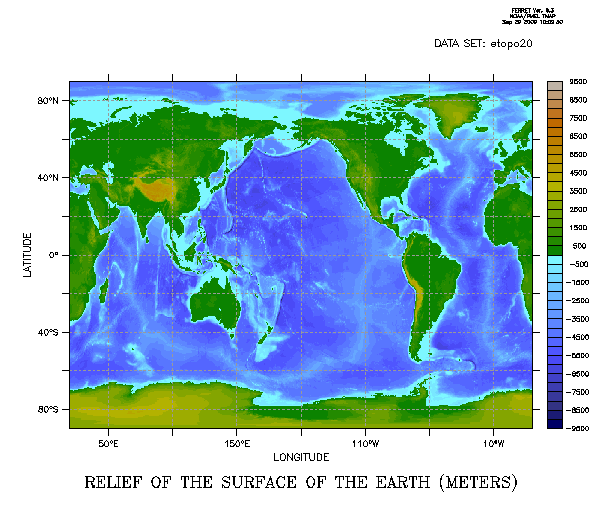
MODE LINECOLORS cannot be canceled; issuing the command CANCEL MODE LINECOLORS will reset the number back to 6.
Ref Sec31.8.14.
SET MODE METAFILE causes Ferret to capture all graphics in metafiles. These metafiles can later be routed to various devices to obtain hard copy output or postscript files.
In PyFerret, metafiles are not used. MODE METAFILE is ignored. If SET MODE METAFILE is issued, PyFerret will issue a NOTE and continue.
The optional argument to MODE METAFILE specifies the name of the output metafile—with no argument, the default name "metafile.plt" is used. Multiple output files (i.e., successive plots) are handled by version number. See the chapter "Computing Environment", section "Output file naming"
See the chapter "Computing Environment", section "Hard copy)" for details on generating graphics files and hard copy.
Example:
yes? SET MODE METAFILE:june_sst.plt
default state: canceled (default argument when set: "metafile.plt")
Ref Sec31.8.15.a
SET MODE NLEVELS
Sets the initial number of contour/color levels that will be used when computing automatic contour levels. Previously this value was always 10. If you are drawing just color plots without contour lines, 40 is a good value to use; if you often use contour lines or FILL/LINE, then a smaller number will look good.
Example:
yes? SET MODE NLEVELS 40

yes? SET MODE/LAST nlevels  ! restores previous value
SET MODE NODATA_LAB
Sets or cancels the NO VALID LABEL that is placed on plots when all the data referenced by the plotting command is missing. Default is SET, so that this label DOES appear, in the middle of the plot for 2D plots, or as part of the labels at the bottom for line plots.
Sometimes it's convenient to plot all-missing data, as an underlay to set up plot axes. In this case, the NO VALID DATA label is not wanted. CANCEL MODE nodata_lab will remove that label.
Example:
yes? USE levitus_climatology

yes? ! This plot has NO VALID DATA across the middle.
yes? SHADE/K=1/X=50E:70E/Y=40:50/NOLAB temp

yes? ! This plot is just blank.
yes? CANCEL MODE nodata_lab
yes? SHADE/K=1/X=50E:70E/Y=40:50/NOLAB temp
Ref Sec31.8.15.
SET MODE PPLLIST
Directs listed output from PPLUS commands (e.g., PPL LIST LABS) to the specified file. This mode is useful for creating scripts that customize plots. The user can specify the name of the output file by giving it as an argument, otherwise file name "ppllist.out" is assigned.
Example:
yes? SET MODE PPLLIST:plot_symbols.txt
yes? PPL LISTSYM
yes? SPAWN grep "WIDTH" plot_symbols.txt
default state: canceled
Ref Sec31.8.16.
SET MODE REFRESH
The SET MODE REFRESH command causes Ferret to update windows following "occlusion" events on X-servers that lack a backing store (SGI workstations have been a case in point).
default state: canceled (except on SGI systems)
Ref Sec31.8.17.
SET MODE SEGMENTS causes Ferret to utilize GKS segments ("GKS" is the Graphical Kernel System—an international graphics standard). On some systems MODE SEGMENTS may be necessary to update windows following "occlusion" events or to resize window with the mouse.
Segments, however, make heavy demands on the system's virtual memory. If Ferret stops during graphics output due to insufficient virtual memory try CANCEL MODE SEGMENTS.
default state: set
Ref Sec31.8.18.
SET MODE STUPID
Note: MODE STUPID is included for diagnostic purposes only.
SET MODE STUPID controls the ability of Ferret to reuse results left in memory from previous commands. It also affects its ability to reuse intermediate variables that are referenced multiple times during complex calculations. Given with no argument
yes? SET MODE STUPID
causes Ferret to forget data cached in memory. The result is that all requests for variables are read from disk and no intermediate calculations are reused. The program will be significantly slower as a result.
A lesser degree of cache limitation occurs with the command
yes? SET MODE STUPID: weak_cache
which causes Ferret to revert to the cache access strategy that it used previous to Ferret version 5.0. In this mode cache hits are unreliable unless the region of interest is fully specified. (Unspecified limits will typically default to the full range of the relevant axis.)
default state: canceled
Ref Sec31.8.19.
SET MODE UPCASE_OUTPUT
By default Ferret changes variable and attribute names to uppercase form, and they are written in uppercase to netCDF files. In order to keep the original lowercase or mixed-case spelling of variable and attribute names when they are written to netCDF files, issue the command
yes? CANCEL MODE UPCASE_OUTPUT
and the original upper- or lower-case spellings to be used.
default state: SET
Beginning with Ferret v7, this MODE also applies to the output of SHOW commands, and the results of commands such as `var,RETURN=xaxis`, so that these outputs reflect what is in the dataset.
Ref Sec31.8.20.
SET MODE VERIFY
SET MODE VERIFY causes commands from a command file ("GO file") to be displayed on the screen as they are executed. Note that if MODE VERIFY is canceled, loop counting in the REPEAT command is turned off.
default state: SET, argument "default"
Note: Many GO files begin with CANCEL MODE VERIFY to inhibit output and end with SET MODE/LAST VERIFY to restore the previous state. Only if an error or interrupt occurs during the execution of such a command file will the state of MODE VERIFY be affected.
SET MODE VERIFY can accept arguments to further refine control over command echoing.
yes? SET MODE VERIFY: DEFAULT
- This will be the default state if no argument is given
- Ferret echos commands taken from GO scripts
- Ferret echos commands in which symbol substitutions occur or in which embedded expressions are evaluated
yes? SET MODE VERIFY: ALL
- In addition to the cases above Ferret also displays the individual commands that are generated by repeat loops and semicolon-separated command groups
- Ferret displays a REPEAT loop counter ("!-> REPEAT: ...")
yes? SET MODE VERIFY: ALWAYS
- Echoing behavior is the same as argument ALL but ALWAYS, in addition, causes CANCEL MODE VERIFY to be ignored when it is encountered in a GO file. This functionality is useful when debugging GO scripts. Entering CANCEL MODE VERIFY or SET MODE VERIFY:DEFAULT from the command line will cancel this state.
Ref Sec31.8.21.
SET MODE WAIT
SET MODE WAIT causes Ferret to wait for a keyboard keystroke from the user after each plotted output is completed. This is useful on graphics terminals that do not have a separate graphics plane; on these terminals SET MODE WAIT prevents the graphical output from being wiped off the screen until the user is ready to proceed.
default state: canceled
Ref Sec31.8.22.
SET MODE 6D_LAB
SET MODE 6D_LAB causes Ferret to show all 6 dimensions in the output of SHOW DATA, SHOW GRID, STATISTICS, and in diagnostic output. To see only the four dimensions X,Y,Z,T issue a "CANCEL MODE 6D_LAB" command. This setting affects only the output listed from these commands; 6D grids may be used when the mode is canceled.
default state: set
Ref Sec31.8.23.
SET MODE DATE_FORMAT
SET MODE DATE_FORMAT:iso causes Ferret to translate time information to ISO 8601 date strings. This includes to dates listed by SHOW commands; shown by LIST commands including text files written with comma- or tab-separated formats; the time-origin listed to netCDF files; results from the TAX_DATESTRING function, and the dates listed in the upper left of plots. This mode is new with Ferret v7.5
default state: canceled
This command works in conjunction with MODE CALENDAR. MODE CALENDAR must be SET, and any argument given to MODE CALENDAR will apply to the formatted ISO 8601 strings.
Example:
yes? set mode date:iso

yes? use monthly_navy_winds

   ! dates listed in the SHOW commands for calendar time axes

yes? use monthly_navy_winds
yes? show axis `uwnd,return=taxis`
 !-> show axis TIME
 name       axis              # pts   start                end
 TIME      TIME               132 r   1982-01-16 20:00     1992-12-17 03:30
T0 = 14-JAN-1980 14:00:00
   Axis span (to cell edges) = 96426


yes? ! dates listed in the header or start of each record when listing to the terminal

 list/i=1/j=1/l=1 uwnd
             VARIABLE : ZONAL WIND (M/S)
             FILENAME : monthly_navy_winds.cdf
             FILEPATH : /home/users/tmap/ferret/linux/fer_dsets/data/
             LONGITUDE: 20E
             LATITUDE : 90S
             TIME     : 1982-01-16 20:00
          0.8972

yes? list/x=300/y=-20/L=30:34 uwnd
             VARIABLE : ZONAL WIND (M/S)
             FILENAME : monthly_navy_winds.cdf
             FILEPATH : /home/users/tmap/ferret/linux/fer_dsets/data/
             SUBSET   : 5 points (TIME)
             LONGITUDE: 60W
             LATITUDE : 20S
                     60W
                    113
 1984-06-17  / 30: -1.517
 1984-07-17  / 31: -1.947
 1984-08-17  / 32: -2.761
 1984-09-16  / 33: -2.074
 1984-10-17  / 34: -1.171


yes? ! restore the default state
yes? cancel mode date_format
Ref Sec31.8.24.
SET MODE DSG
SET MODE DSG (v7.6 and higher) Causes Ferret to look for a global featureType attribute and if it is found, interpret the file using the CF standard for Discrete Sampling Geometries (DSG) contiguous ragged array form. CANCEL MODE DSG causes Ferret to ignore the DSG attributes in the dataset.
default state: set
Ref Sec31.9.
SET MOVIE
/COMPRESS /FILE /LASER /START
Note: HDF movies were discontinued with Ferret v6.6. The HDF-5 library used by NetCDF-4 does not contain the call that was used to make these movies. See the documentation in chapter 5 Note on using whirlgif to make a movie about creating animations from a set of gif or png images.
Ref sec31.10.
SET NCCACHE
Changes the chunk cache settings from the defaults. (Ferret v6.6 and higher) The options are:
SET NCCACHE/SIZE/NELEMS/PREEMPT
/SIZE= new size in mb
/NELEMS see the netcdf4 documentation
/PREEPMT see the netcdf4 documentation
See the NetCDF documentation for details about these settings.
http://www.unidata.ucar.edu/software/netcdf/
Ref Sec31.11.
SET REDIRECT
Allows messages and data listings normally printed to the console to be written to a file. The options are:
/TEE write the messages to file as well as to the console
/JOURNAL write the messages to the journal (prefixed with '! ')
/FILE= write the messages to the file named by this option
/APPEND append to the above file if it exists
/CLOBBER overwrite the above file if it exists
The additional arguments STDOUT and/or STDERR can be given to indicate which information is redirected (or no longer redirected). If STDOUT is given, informational messages and data listings will be redirected. If STDERR is given, error and warning messages will be redirected. If neither is given, STDOUT will be assumed.
Beginning with Ferret v6.9, whenever SET REDIRECT has been issued, Ferret writes extra lines to the output file(s) specified in the redirection. These lines show the GO calls made, and where the session exits every GO script. Run Unix command line tool FshowGO on this file to show the nested calls to scripts in that session, together with any script arguments. The GO lines shown are the scripts and arguments exactly as they were run by the Ferret session.
- Using the /JOURNAL /TEE options will record messages and data listings in the journal file while still being written to the console.
- Under Linux, unwanted output (such as known warnings) can be eliminated by using the option /FILE="/dev/null"
- The STDOUT and STDERR redirects can go to different files by using two SET REDIRECT commands.
- Information written to a file may not be visible until that file is closed by Ferret. Use CANCEL REDIRECT to close a redirect file without shutting down Ferret.
Examples:
Send all of the output to a file, and to the console.
yes? SET REDIRECT/TEE/CLOBBER/file=log.txt
yes? GO my_script
yes? CANCEL REDIRECT
Keep any errors or warnings in a file and show them on the console, otherwise operate silently.
yes? SET REDIRECT/TEE/CLOBBER/FILE=errors.txt STDERR
yes? SET REDIRECT/CLOBBER/FILE="/dev/null" STDOUT
yes? go my_script

! Now see all commands at the console, but continue sending errors also to errors.txt
yes? CANCEL REDIRECT STDOUT
When SET REDIRECT is turned on, lines are added to the output file that are used by FshowGO to trace all of the calls made in scripts
yes? set redirect/file=demo_out.txt
yes? go mp_stereo_demo
yes? quit
Use the Unix command FshowGO to see all of the calls that this demo made, including the arguments to the scripts.
> > FshowGO demo_out.txt
  GO mp_stereo_demo
    GO mp_stereographic_north 320 45
    GO mp_aspect
    GO mp_land
    GO mp_polymark pOLY/OVER/NOLAB/NOAXES/NOKEY/PALETTE=black xlon, ylat, , square, 0.3
      GO polymark pOLY/OVER/NOLAB/NOAXES/NOKEY/PALETTE=black x_page*mp_mask y_page*mp_mask 0 square 0.3
        GO polyshape square
    GO mp_graticule 280 360 10 10 80 10
    GO mp_label 280 8 0 -40 0.12 "@CR280"
    GO mp_label 290 8 0 -30 0.12 "@CR290"
...
    GO mp_label 260 70 1 0 0.14 "@CRETOPO Topography"
    GO mp_label mid_lon 5 0 0 .18 "@CRObservation Sites"
Ref Sec31.12.
SET REGION
/I/J/K/L/M/N /X/Y/Z/T/E/F /DI/DJ/DK/DL/DM/DN /DX/DY/DZ/DT/DE/DF
Specifies the default space-time region for the evaluation of expressions.
yes? SET REGION[/qualifiers] [ reg_name]
See the chapter "Grids and Regions", section Regions for further information.
Examples:
1) yes? SET REGION/X=140E
Sets X axis position in the default context.
2) yes? SET REGION/@N !N specifies X and Y but not Z or T
Sets only X and Y in the default context (since X and Y are defined in region N but Z and T are not).
3) yes? SET REGION N
Sets ALL AXES in the default region to be exactly the same as region N. Since Z and T are undefined in region N they will be set undefined in the default context.
4) yes? SET REGION/@N/Z=50:250
Sets X and Y in the default region to be exactly the same as region N and then sets Z to the range 50 to 250.
5) yes? SET REGION/DZ=-5
Set the region along the Z axis to be 5 units less than its current value.
6) yes? SET REGION/DJ=-10:10
Increases the current vertical axis range by 10 units on either end of the axis.
Command qualifiers for SET REGION:
SET REGION/I=/J=/K=/L=/M=/N=/X=/Y=/Z=/T=/E=/F=
Sets region bounds for specified axis subscript (I, J, K, L, M, or N) or axis coordinates (X, Y, Z, T, E, or F). See examples above.
SET REGION/DI=/DJ=/DK=/DL=/DM=/DN=/DX=/DY=/DZ=/DT=/DE=/DF=
Modifies current region information by the specified increment of an axis subscript (I, J, K, L, M, or N) or axis coordinate (X, Y, Z, T, E, or F). See examples above. Syntax: /D*=val, or /D*=lo:hi.
Ref Sec31...
PyFerret only
SET TEXT/FONT= /COLOR= /ISIZ= /ITALIC /BOLD [text-group name]
Set the text style for labels on plots. Text settings may be made for all text at once, and after a SET TEXT has been issued to turn on PyFerret fonts, the text-group names specify a particular style for a set of lables, e.g. the tic-mark labels on axes, the main title, the colorbar labels. See also SHOW TEXT and CANCEL TEXT. Text settings persist in the PyFerret session. Once labels have been drawn as part of a plot, the text style for those labels is not changed by further SET TEXT settings. Any new labels drawn after a call to SET TEXT will be drawn with that style.
CANCEL TEXT will turn off PyFerret font drawing, returning to the classic-Ferret Hershey fonts. Fonts may be SET or CANCELed within one plot drawing.
/FONT=
In PyFerret, the SET TEXT/FONT= option is used to name a font. The fonts available are those available to the Python packages, generally these are the fonts available on your system. The HERSHEY font which draws letters exactly as is done in Ferret, is currently the default.
yes? set text/font=arial
/COLOR=
SET TEXT/COLOR= makes a color setting. The argument may be a Ferret color setting, or the form (R,G,B) or (R,G,B,A).
yes? set text/font=arial/color=(20,50,70)  ! or,

yes? set text/font=courier/color=blue
For contour plots, the text on the contour lines themselves will be the same color as the contour lines themselves unless a setting is made on the sub-group for CONTOUR labels, see below.
/ISIZ=
The SET TEXT/ISIZ= option bumps the defult size of all text up or down. The argument is an integer between -4 and 4 to make text smaller or larger.
/ITALIC
The SET TEXT/ITALIC option sets the text to italic style, if it is available in the currently chosen font. If there is no italic style, the font is used as is.
/BOLD
The SET TEXT/BOLD option sets the text to bold style, if it is available in the currently chosen font.
The following text groups are defined for SET TEXT. When a text group name is given on the SET TEXT command, the settings are applied only to that text grouping. If there is no argument, the settings are applied to all text. When using text groupings, any global text settings persist until changed with another SET TEXT command or with CANCEL TEXT. Note that text group settings are applied only if PyFerret fonts have been first turned on with a general SET TEXT/FONT= command without a text group.
|
text-group name |
description |
|---|---|
| HTICS | tic mark labels on horizontal axis |
| VTICS | tic mark labels on vertical axis |
| TITLE | main title |
| HLAB | horizontal axis label |
| VLAB | vertical axis label |
| CONTOUR | contour labels |
| LOGO | Ferret logo |
| CBAR | colorbar labels |
| MOVEABLE | moveable (user added) labels |
Examples:
Make a global font setting, and a customization for the colorbar labels. The labels will all be in the same font, Times. In addition the color key labels are smaller and italic.
! The labels will all be in the same font, Times. In addition the color key labels are smaller and italic.

yes? set text/font=times
yes? set text/italic/isiz=-2 CBAR

yes? shade/key=horizontal my_var

yes? cancel text  ! restores defaults
Large labels look good with the PyFerret fonts. Choosing a style for the moveable labels (added with the LABEL or ANNOTATE commands).
yes? set text/font=arial
yes? fill sst

yes? set text/italic/bold moveable

yes? annotate/norm/xpos=0.5/ypos=0.5/halign=0/siz=0.2  "COADS January Temperature"
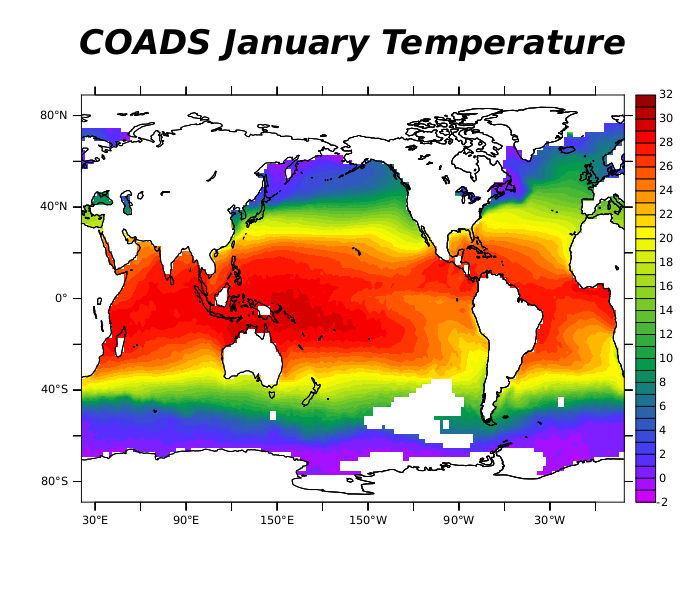
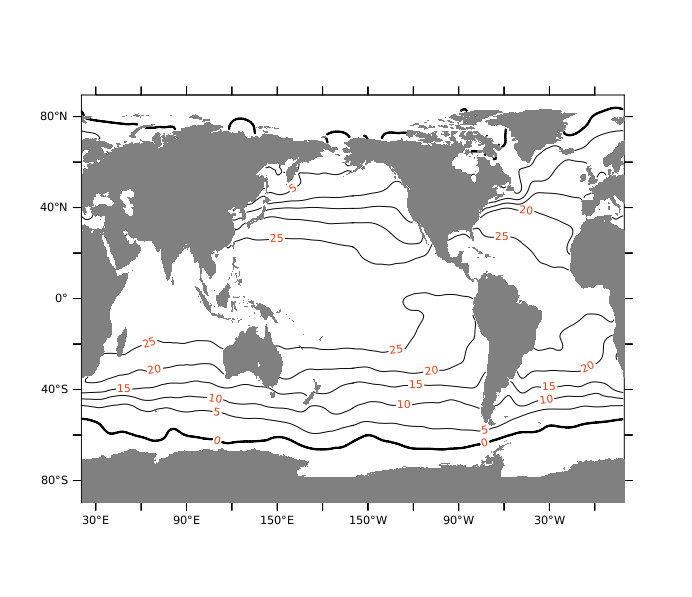
Control over contour label text helps them stand out. Note that without a SET TEXT/COLOR= setting for the contour text-group, the contour labels always match the color of the contour lines.
yes? use levitus_climatology
yes? set text/font=arial
yes? set text/color=(100,20,0) contour
yes? contour/z=0/nolab temp
PyFerret: embedding Special Characters in labels
Using PyFerret, we have access to special characters including Math symbols, Greek and other non-Latin alphabets, and International symbols such as the Euro sign, by means of HTML character syntax, e.g. see references such as
 http://www.w3schools.com/html/html_symbols.asp
http://www.w3.org/TR/html401/sgml/entities.html
Example:
The following title specifications both put a lowercase letter tau into the title as shown below.
yes? set text/font=arial  ! we must use a font other than the Hershey font

yes? plot/title="stress <#964>-x" tau  ! or,
yes? plot/title="stress <&tau>-x" tau
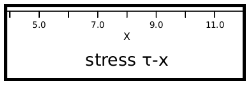
The syntax is either <#nnnn> where the number is up to four digits as listed in the HTML character tables, or <&name> if a name is assigned. When the character is a Greek letter, capitalizing the name will result in a capital letter.
Examples:
yes? set text/font=arial yes? shade/title="Delta <&Delta> and chi <&chi>" myvar yes? let/units="<°>C"/title=`"temp,return=title"` plotvar = temp yes? plot/z=40 plotvar yes? ! Now make a blue Diamond symbol at a location. yes? set text/color=blue yes? annotate/user/x=0/y=50/siz=0.2/halign=0/valign=0 "<&diams>"
- NOTE: Care should be taken when defining attributes for variables. In the example
yes? let/units="<°>C"/title=`"temp,return=title`" plotvar = temp yes? plot/z=40 plotvar
we define a variable for plotting with the units string containing a degree sign. However saving a variable to a netCDF file with units of "<°>C" is non-standard.
The following tables list all of the names recognized by PyFerret, along with the corresponding numerical codes. See the references sited above for examples of the symbols, or try them in PyFerret: (At this time, these are not all tested. Some may interact with Ferret/PyFerret causing spurious warnings or other unexpected behavior.)
Greek Alphabet
|
name |
numerical code |
||
|---|---|---|---|
| Alpha | 913 | alpha | 945 |
| Beta | 914 | beta | 946 |
| Gamma | 915 | gamma | 947 |
| Delta | 916 | delta | 948 |
| Epsilon | 917 | epsilon | 949 |
| Zeta | 918 | zeta | 950 |
| Eta | 919 | eta | 951 |
| Theta | 920 | theta | 952 |
| Iota | 921 | iota | 953 |
| Kappa | 922 | kappa | 954 |
| Lambda | 923 | lambda | 955 |
| Mu | 924 | mu | 956 |
| Nu | 925 | nu | 957 |
| Xi | 926 | xi | 958 |
| Omicron | 927 | omicron | 959 |
| Pi | 928 | pi | 960 |
| Rho | 929 | rho | 961 |
| Sigma | 931 | sigma | 963 |
| sigmaf | 962 | ||
| Tau | 932 | tau | 964 |
| Upsilon | 933 | upsilon | 965 |
| Phi | 934 | phi | 966 |
| Chi | 935 | chi | 967 |
| Psi | 936 | psi | 968 |
| Omega | 937 | omega | 969 |
Math and Symbols
|
name |
numerical code |
|---|---|
| bksp (backspace) | 8 |
| fnof | 402 |
| thetasym | 977 |
| upsih | 978 |
| piv | 982 |
| bull | 8226 |
| hellip | 8230 |
| prime | 8242 |
| Prime | 8243 |
| oline | 8254 |
| frasl | 8260 |
| weierp | 8472 |
| image | 8465 |
| real | 8476 |
| trade | 8482 |
| alefsym | 8501 |
| larr | 8592 |
| uarr | 8593 |
| rarr | 8594 |
| darr | 8595 |
| harr | 8596 |
| crarr | 8629 |
| lArr | 8656 |
| uArr | 8657 |
| rArr | 8658 |
| dArr | 8659 |
| hArr | 8660 |
| forall | 8704 |
| part | 8706 |
| exist | 8707 |
| empty | 8709 |
| nabla | 8711 |
| isin | 8712 |
| notin | 8713 |
| ni | 8715 |
| prod | 8719 |
| sum | 8721 |
| minus | 8722 |
| lowast | 8727 |
| radic | 8730 |
| prop | 8733 |
| infin | 8734 |
| ang | 8736 |
| and | 8743 |
| or | 8744 |
| cap | 8745 |
| cup | 8746 |
| int | 8747 |
| there4 | 8756 |
| sim | 8764 |
| cong | 8773 |
| asymp | 8776 |
| ne | 8800 |
| equiv | 8801 |
| le | 8804 |
| ge | 8805 |
| sub | 8834 |
| sup | 8835 |
| nsub | 8836 |
| sube | 8838 |
| supe | 8839 |
| oplus | 8853 |
| otimes | 8855 |
| perp | 8869 |
| sdot | 8901 |
| lceil | 8968 |
| rceil | 8969 |
| lfloor | 8970 |
| rfloor | 8971 |
| lang | 9001 |
| rang | 9002 |
| loz | 9674 |
| spades | 9824 |
| clubs | 9827 |
| hearts | 9829 |
| diams | 9830 |
Special characters
|
name |
numerical code |
|---|---|
| nbsp | 160 |
| iexcl | 161 |
| cent | 162 |
| pound | 163 |
| curren | 164 |
| yen | 165 |
| brvbar | 166 |
| sect | 167 |
| uml | 168 |
| copy | 169 |
| ordf | 170 |
| laquo | 171 |
| not | 172 |
| shy | 173 |
| reg | 174 |
| macr | 175 |
| deg | 176 |
| plusmn | 177 |
| sup2 | 178 |
| sup3 | 179 |
| acute | 180 |
| micro | 181 |
| para | 182 |
| middot | 183 |
| cedil | 184 |
| sup1 | 185 |
| ordm | 186 |
| raquo | 187 |
| frac14 | 188 |
| frac12 | 189 |
| frac34 | 190 |
| iquest | 191 |
| Agrave | 192 |
| Aacute | 193 |
| Acirc | 194 |
| Atilde | 195 |
| Auml | 196 |
| Aring | 197 |
| AElig | 198 |
| Ccedil | 199 |
| Egrave | 200 |
| Eacute | 201 |
| Ecirc | 202 |
| Euml | 203 |
| Igrave | 204 |
| Iacute | 205 |
| Icirc | 206 |
| Iuml | 207 |
| ETH | 208 |
| Ntilde | 209 |
| Ograve | 210 |
| Oacute | 211 |
| Ocirc | 212 |
| Otilde | 213 |
| Ouml | 214 |
| times | 215 |
| Oslash | 216 |
| Ugrave | 217 |
| Uacute | 218 |
| Ucirc | 219 |
| Uuml | 220 |
| Yacute | 221 |
| THORN | 222 |
| szlig | 223 |
| agrave | 224 |
| aacute | 225 |
| acirc | 226 |
| atilde | 227 |
| auml | 228 |
| aring | 229 |
| aelig | 230 |
| ccedil | 231 |
| egrave | 232 |
| eacute | 233 |
| ecirc | 234 |
| euml | 235 |
| igrave | 236 |
| iacute | 237 |
| icirc | 238 |
| iuml | 239 |
| eth | 240 |
| ntilde | 241 |
| ograve | 242 |
| oacute | 243 |
| ocirc | 244 |
| otilde | 245 |
| ouml | 246 |
| divide | 247 |
| oslash | 248 |
| ugrave | 249 |
| uacute | 250 |
| ucirc | 251 |
| uuml | 252 |
| yacute | 253 |
| thorn | 254 |
| yuml | 255 |
Markup-significant and Internationalization
|
name |
numerical code |
|---|---|
| quot | 34 |
| amp | 38 |
| lt | 60 |
| gt | 62 |
| OElig | 338 |
| oelig | 339 |
| Scaron | 352 |
| scaron | 353 |
| Yuml | 376 |
| circ | 710 |
| tilde | 732 |
| ensp | 8194 |
| emsp | 8195 |
| thinsp | 8201 |
| zwnj | 8204 |
| zwj | 8205 |
| lrm | 8206 |
| rlm | 8207 |
| ndash | 8211 |
| mdash | 8212 |
| lsquo | 8216 |
| rsquo | 8217 |
| sbquo | 8218 |
| ldquo | 8220 |
| rdquo | 8221 |
| bdquo | 8222 |
| dagger | 8224 |
| Dagger | 8225 |
| permil | 8240 |
| lsaquo | 8249 |
| rsaquo | 8250 |
| euro | 8364 |
PyFerret: subscripts and superscripts in labels
In PyFerret, when using pyFerret fonts, the tags <sub> </sub> enclosing text in a label will make that portion of the text a subscript; likewise <sup> </sup> will make the enclosed text a superscript.
yes? plot/title="m<sup>2</sup>" area
-
Note: care should be taken when defining variables. Saving a variable to a netCDF file with units of "m<sup>2</sup>" is non-standard.
Ref Sec31.13.
/BAD /GRID /TITLE /UNITS /DATASET /NAME /OFFSET /SCALE /OUTTYPE
Modifies characteristics of a variable defined by DEFINE VARIABLE or SET DATA/EZ. This command permits variables within a single EZ data set to be defined on different grids and it allows the titles and units to be superseded for the duration of a session, only, on netCDF and GT data sets.
Note that LET is an alias for SET VARIABLE.
yes? SET VARIABLE/qualifiers variable_name
Parameters
The variable name can be a simple name or a name qualified by a data set.
Example:
yes? SET VAR/UNITS="CM" WIDTH[D=snoopy]
Command qualifiers for SET VARIABLE:
Ref Sec31.13.1.
SET VARIABLE/BAD=
Designates a value to be used as the missing data flag. The qualifier is applicable to EZ data set variables and to netCDF data sets. The bad value which is specified will be used in subsequent outputs and calculations involving this variable. It applies only for the duration of the current Ferret session. It does not alter the data files. It is not applicable to variables defined with DEFINE VARIABLE.
For netCDF files only, if the file contains Fortran NaN (not a number), the user may designate NaN as the bad value flag for a given variable in a netCDF dataset. SET VARIABLE/BAD=NAN.
When the command SET VARIABLE/BAD= is be used to set one of the two missing value flags of a file variable, the bad value which is specified will be used in subsequent outputs and calculations involving this variable.
Ferret is aware of up to two missing value flags for each variable in a netCDF file. Under most circumstances, netCDF file variables use only a single flag. With a command like
SET VARIABLE/BAD=-999 my_file_var
you can specify -999 as an additional missing value flag. It is this value which will be present in all subsequent SAVEs to files and calculations.
Note that if the netCDF file contains two distinct flag values specified by the netCDF attributes "missing_value" and "_FillValue", then this command will migrate the value specified by missing_value to the position previously occupied by _FillValue and replace the one specified by missing_value. Thus a double usage of this command allows you to control both flags. You can use the command "SHOW DATA/VARIABLES" to see both bad value flags.
Ref Sec31.13.2.
Sets the defining grid for a variable in an EZ data set. The argument may be an expression.
Example:
yes? SET VARIABLE/GRID=my_grid width[D=snoopy]
This is the mechanism by which the shape of the data (1D along T axis, 2D in the XY plane, etc.) is specified. By default Ferret will use grid EZ, a line of up to 20480 points oriented along the X axis. The qualifier is not applicable to variables defined with DEFINE VARIABLE.
Ref Sec31.13.2a.
SET VARIABLE/NAME=
This is effectively a RENAME command -- applies to all classes of variables (but not pseudo-variables). Useful for renaming variables whose names are incorrect, or not meaningful; or if we want to define a new variable but name it using an existing variable name (see Example 2 below). A common application of this is in creating output netCDF files in which contain modified versions of variables from input files.
yes? SET VARIABLE/NAME=new old
Example 1:
Give more useful names to a variable in a dataset. This changes the names for the variables that Ferret stored when it initialized the dataset. (In this example, we would probably also want to use SET VAR/UNITS and SET VAR/TITLE to set those attributes for the variables.)
yes? SHOW DATA
     currently SET data sets:
    1> http://ferret.pmel.noaa.gov/thredds/dodsC/data/PMEL/fake_data.nc  (default)
 name     title                             I         J         K         L         M         N
 V1      V1                                1:180     1:90      ...       1:12      ...       ...
 V2      V2                                1:180     1:90      ...       1:12      ...       ...


yes? SET VARIABLE/NAME=north_vel V1[d=1]
yes? SET VARIABLE/NAME=east_vel V2[d=1]

yes? SHOW DATA
     currently SET data sets:
    1> http://ferret.pmel.noaa.gov/thredds/dodsC/data/PMEL/fake_data.nc  (default)
 name     title                             I         J         K         L         M         N
 NORTH_VEL      V1                         1:180     1:90      ...       1:12      ...       ...
 EAST_VEL       V2                         1:180     1:90      ...       1:12       ...       ...
Example 2:
Sometimes we want to define a new variable but use an existing variable name. Say there is a variable "temp" in the dataset and a mask to apply to it, showing where the data is to be treated as valid and invalid. Every time we use "temp" we'll want to apply the mask. To define a masked temperature, we could say "LET masked_TEMP = " but because we want to always use the masked variable, it would be nice if the new variable were named "temp" instead. So, rename the file variable and define a new variable with the name we want to use.
yes? USE temp_dat
yes? SHOW DATA
     currently SET data sets:
    1> ./temp_dat.nc  (default)
 name     title                             I         J         K         L         M         N
 TEMP     TEMPERATURE                      1:360     1:180     1:20      ...       ...       ...
 MASK                                      1:360     1:180      ...      ...       ...       ...

! We want the masked variable to be named TEMP.  So re-name the file variable to something else.

yes? SET VARIABLE/NAME=temp_in temp[d=1]

! Define the masked TEMP variable. Use SET VAR/UNITS and /TITLE to keep these attributes from the file variable.

yes? LET/D=1   temp = IF mask EQ 1 THEN temp_in
yes? SET VAR/UNITS="`temp_in,RETURN=units`"/TITLE="`temp_in,RETURN=title`"  temp

yes? SHOW DATA
     currently SET data sets:
    1> ./temp_dat.nc  (default)
 name     title                             I         J         K         L         M         N
 TEMP_IN  TEMPERATURE                      1:360     1:180     1:20      ...       ...       ...
 MASK                                      1:360     1:180      ...      ...       ...       ...
 ------------------------------
 TEMP[D=temp_dat] = IF MASK EQ 1 THEN TEMP_IN

yes? SHADE/K=1 temp
Ref Sec31.13.3.
SET VARIABLE/TITLE=
Associates a title with the variable. This title appears on plotted outputs and listings. The qualifier is applicable to all variables.
yes? SET VARIABLE/TITLE="title string" var_name
SET VARIABLE/UNITS=
Associates units with the variable. The units appear on plotted outputs and listings. The qualifier is applicable to all variables.
yes? SET VARIABLE/UNITS="units string" var_name
Ref Sec31.13.4.
SET VARIABLE/OFFSET=
For variables in netCDF files only, set an offset which will always be applied when the data is read from the file. This offset is applied after any offset factor specified by an attribute in the file. For applying a scale and offset to data when writing data to a netCDF file see writing packed data to a netCDF file
An application of this is when we want to use a variable to define an axis, but the variations in the data aren't well represented by a single precision variable. This is described in the section on DEFINE AXIS/FROM_DATA.
Ref Sec31.13.5.
SET VARIABLE/SCALE=
For variables in netCDF files only, set a scale factor which will always be applied when the data is read from the file. This factor is applied after any scale factor specified by an attribute in the file. See also SET VARIABLE/OFFSET, above.
When a scale factor and offset are specified, the scale factor is applied first:
var = scale*var_in + offset
If scale and offset values have been set, with either netCDF attributes or with a SET VARIABLE/SCALE=/OFFSET=, they may be accessed with the RETURN= keyword.
Example:
yes? USE coads_climatology
yes? SAY `sst,RETURN=nc_scale`
!-> MESSAGE/CONTINUE 1
1
yes? SAY `sst,RETURN=nc_offset`
!-> MESSAGE/CONTINUE 0
0
yes? SET VAR/SCALE=10/OFF=50 sst
yes? SAY `sst,RETURN=user_off`
!-> MESSAGE/CONTINUE 50
50
yes? SAY `sst,RETURN=user_scale`
!-> MESSAGE/CONTINUE 10
10
Ref Sec31.13.6.
SET VARIABLE/OUTTYPE=
We can control the data type of variables written to output netCDF files, with SET VAR/OUTTYPE=. The netCDF library is used to convert the data type of a Ferret FLOAT value to the requested output type. The types allowed are DOUBLE, FLOAT, INT, SHORT, and BYTE, or use SET VAR/OUTTYPE=INPUT to preserve the type the data had on input. To write integers, for instance,
yes? SET DATA etopo60
yes? SET VAR/OUTTYPE=int4 rose
yes? SAVE/X=180/FILE=r_int.nc rose
LISTing to file a.nc

*** NOTE: Converting data type of missing_value NC_FLOAT to match output type of variable NC_INT
** netCDF error:
data in attribute missing_value not representable in output type NC_INT
Here, the missing_value of the variable cannot be represented as an integer, and the variable was not written. Correct for this by assigning a new missing_value to the variable before writing:
yes? SET DATA etopo60
yes? SET VAR/OUTTYPE=int4/BAD=200000 rose
yes? SAVE/X=180/FILE=r_int.nc rose
   LISTing to file a.nc
*** NOTE: Converting data type of missing_value NC_FLOAT to match output type of variable NC_INT
Note that not all data can be represented in all types. Also note that prior to Ferret v6.8, when data is written to DOUBLE (or any other type for that matter), it is always converted from the Ferret internal representation of single precision FLOAT data: Even if the original data was double precision, when it is read from the netCDF file it is always converted to single precision.
Ref Sec31.14. SET
SET VIEWPORT
Sets the rectangular region within the output window where output will be drawn.
yes? SET VIEWPORT view_name
Issuing the command SET VIEWPORT is best thought of as entering "viewport mode." While in viewport mode all previously drawn viewports remain on the screen until explicitly cleared with either SET WINDOW/CLEAR or CANCEL VIEWPORT. If multiple plots are drawn in a single viewport without the use of /OVERLAY the current plot will erase and replace the previous one; the graphics in other viewports will be affected only if the viewports overlap. If viewports overlap the most recently drawn graphics will always lie on top, possibly obscuring what is underneath. By default, the state of "viewport mode" is canceled.
Pre-defined viewports exist for dividing the window into four quadrants and for dividing the window in half horizontally and vertically. See the chapter "Customizing Plots", section 6.7, Pre-defined Viewports, for a list.
Ref Sec31.15.
SET WINDOW
/ASPECT /CLEAR /LOCATION /NEW /SIZE /TITLE
Additional PyFerret-only qualifiers for SET WINDOW:
/ANTIALIAS /NOANTIALIAS /COLOR /OPACITY /THICKEN /OUTLINE /SCALE /TEXTPROM /XINCHES /YINCHES /XPIXELS /YPIXELS /QUALITY /ENGINE /WMARK /WMSCALE /WMOPAC /WMXLOC /WMYLOC
Creates, resizes, reshapes or moves graphics output windows.
yes? SET WINDOW[/qualifiers] [window_number]
Note: Multiple windows may be simultaneously viewable but only a single window receives output at any time.
See commands SHOW WINDOWS and CANCEL WINDOW for additional information.
Examples:
1) yes? SET WINDOW/NEW
Creates a new output window and sends subsequent graphics to it.
2) yes? SET WINDOW 3
Sends subsequent graphics to window 3.
3) yes? SET WINDOW/SIZE=.5
Resizes current window to ½ of full.
4) yes? SET WINDOW/ASPECT=.5
Reshapes current window with Y/X equal to 1:2. The effect of this command is not seen until a plot is sent to the window.
5) yes? SET WINDOW/LOCATION=0,.5
Puts the lower left corner of the current window at the left border of the display and half way up it.
6) yes? SET WINDOW/TITLE="new title"
On the next new window, changes the title in the top bar.
Command qualifiers for SET WINDOW:
SET WINDOW/ASPECT
Sets the aspect ratio of the output window and hard copy. Note the new ratio doesn't take effect until a plot command is issued in the window.
See the discussion below for PyFerret-only settings for /ASPECT combined with window size settings in inches or pixels.
Examples:
1) yes? SET WINDOW/ASPECT=y_over_x n
Sets the overall aspect ratio of window n.
2) yes? SET WINDOW/ASPECT=y_over_x
Sets the overall aspect ratio of the current window.
3) yes? SET WINDOW/ASPECT=y_over_x:AXIS
Sets the axis length aspect ratio of the current window.
The total size (area) of the output window is not changed.
The default value for the overall window ratio is y/x = 8.8/10.2 ~ 0.86.
The default value for the axis length ratio is y/x = 6/8 = 0.75.
Use PPLUS/RESET or SET WINDOW/ASPECT=.75:AXIS to restore defaults.
The aspect ratio specified is a default for future SET WINDOW commands
The origin (lower left) is restored to its default values: 1.2, 1.4
When using "SET WINDOW n" to return to a previous window that differs from the current window in aspect ratio, it is necessary to re-specify its aspect ratio with /ASPECT, otherwise PPLUS will not be properly reset. If you return to a previous window, you cannot expect to make an overlay on the plot that is there. The PPLUS settings for axis lengths and other properties of the plot will have been overwritten.
SET WINDOW/CLEAR
Clears the image(s) in the current or specified window. Useful with viewports.
SET WINDOW/LOCATION
Sets the location for the lower left corner of named (or current) window. The coordinates x and y must be values between 0 and 1 and refer to distances from the lower left corner of the display screen (total length and width of which are each 1).
yes? SET WINDOW/LOCATION=x,y [window_number]
SET WINDOW/NEW
Causes future graphical output to be directed to a new window. The window will be created at the next graphics output.
yes? SET WINDOW/NEW
SET WINDOW/SIZE
Resizes a window to r times the area of the standard window. (The length of the sides changes by the square root of r.) If the window number is omitted the command will resize the currently active window. (The default window size is 0.7.)
yes? SET WINDOW/SIZE=r [window_number]
Prior to Ferret v6.8, the actual size of the window is reset to fit on the output device.
Starting with Ferret v6.8, the size is not limited. This allows creation of large gif images; setting the size of a gif image is described in the FAQ, controlling the size of GIF output. In standard x-windows mode, the window is no longer limited by the size of the monitor window, so the image may extend outside your viewing area, and in some instances Ferret may crash. In batch postscript mode, and when using metafiles, setting the size of the window has no effect.
SET WINDOW/TITLE[=title text]
On the next new window, changes the title in the top bar. By default this title is FERRET_n_date:time, where n is the window number, and the date and time are for the Ferret session (see the symbols SESSION_DATE and SESSION_TIME). The title is saved in the symbol WIN_TITLE.
! After drawing a plot, the title at the top of the window is of the form
!  FERRET_1_8-Aug-08:13:07

yes? PLOT/I=1:5 i
yes? SHOW SYMBOL win_title  WIN_TITLE = "8-Aug-08:13:07"

yes? SET WINDOW/NEW/SIZE=0.3/TITLE="small window"
yes? SHOW SYMBOL win_title
WIN_TITLE = "small_window"
The title at the top of the window will be FERRET_2_small_window.
PyFerret Only qualifiers for SET WINDOW:
/ANTIALIAS /NOANTIALIAS
Assigns whether lines are draw with or without anti-aliasing. The default is to use anti-aliasing, which results in lines that appear smoother in raster (such as PNG and JPEG) images. Rarely will one want to turn off anti-aliasing. Only one of these options can be given.
/COLOR=
Assigns the color of the background of the window as well as images saved from this window. The color may be specified as a color name or color number as in Ferret; or with an (R,G,B) or (R,G,B,A) value. The values of R, G, B, and A go from zero to 100 and are the percent of red, green, blue, and opacity (alpha channel) for the color.
/OPACITY=
Opacity is a value between 0 and 100. The opacity of the background color is also used when saving images in formats, such as PNG, that support opactity (the alpha channel). The /TRANSPARENT option to the FRAME command in PyFerret is equivalent to temporarily setting SET WINDOW /OPACITY=0 for just the image being saved by that FRAME command.
/THICKEN=
Assigns the line thickness scaling factor for the window. Any line thicknesses, even those explicitly specified, are scaled by this factor before being drawn. This allows one to modify the thickness of all lines in a plot to suit ones needs. This value will need to be modified if one significantly changes the actual size of the plot window using the /XINCHES= /YINCHES= PyFerret options to the SET WINDOW command.
/OUTLINE=
When drawing color-filled rectangles and other polygons, this option allows one to specify the thickness of a outline to be drawn around each polygon. The color of the outline will be the same as the fill color. The main purpose of this option is to provide a work-around fix to some PostScript and PDF viewers that show thin white lines in FILL and SHADE plots. Typically only a very small value (0.05) is needed for this fix. If a value of zero is given, these outlines will not be drawn. The default behavior is to not draw these outlines.
/SCALE=
Assigns the scaling factor for an image before being displayed in a window. This option can also be used to enable or disable automatic rescaling of the image. This option provides the same functionality as the menu option Scene -> Scale for the displayed windows. By default, automatic rescaling is turned on; the image is rescaled to fit changes in the displayed window frame size from the mouse dragging. When automatic rescaling is turned off, the image is scaled by the specified scaling factor. The displayed window frame may be resized as best possible to fit the image size as well as the display size, but scroll bars or white space around the image may appear. When automatic rescaling is turned on, the image is scaled to best fit the displayed window frame size but the displayed window frame size is constrained to fit the image aspect ratio; normally there are no scrollbars or white space around the image.
-
If the scale value is a positive number, automatic rescaling of the image is turned off and then the image is scaled by that value.
-
If the value is negative, the image is scaled by the positive of that value and then automatic rescaling of the image is turned on; thus the displayed window frame maybe be adjusted to fit the scaled image size, but then the image may be rescaled to fit the actual displayed window frame size.
-
If the value is zero, the current image scaling factor is used but automatic rescaling of the image is turned on.
/TEXTPROM=
Assigns the scaling factor for all text in the window. All text sizes, even those explicitly specified, are scaled by this factor before being drawn. This allows one to modify the size of all text in a plot to suit ones needs. Rarely will this option be need as text is automatically adjusted for the window "inch" size.
/XINCHES= /YINCHES= /ASPECT=
Assigns the actual "inch" size of the working plot being shown. This should only be used by advanced users that want to have an known plot "inch" size when creating the plot, such as for explicit placement of labels relative to the edges of the window. (See the ANNOTATE command for a flexible method for putting labels onto a plot.) Only two the these three options can be given. If you only want specify the inch size of a saved image, use the /XINCHES /YINCHES PyFerret options to the FRAME commands.
/XPIXELS= /YPIXES= /ASPECT=
Assigns the default pixels size of the working plot being shown. Using these options is preferred over the use of the /SIZE option. These options scale the displayed plot to the indicated size but do not affect the actual "inch" size of the working plot. Normally these options are used when one wants to see how a raster image of the given size and aspect ratio will look when saved. Only two the these three options can be given. If you only want specify the pixel size of a saved image, use the /XPIXELS /YPIXELS PyFerret options to the FRAME commands.
/QUALITY=
Set the quality of the plot. The default, /QUALITY=HIGH should almost always be used. The other option is /QUALITY=DRAFT which can be useful for on-the-fly animations, or may give quicker displayed but lower quality plots when displaying plots remotely over a slow connection.
/ENGINE=
Set the graphics engine to perform the plotting. This should only be used by very advanced users, or programmers wishing to develop their own PyFerret graphics engine. All standard options are available to the usual users through other commands. Currently the only options are /ENGINE=Cairo (almost equivalent to using the PyFerret -nodisplay command-line option), /ENGINE=PipedViewerPQ (equivalent to SET WINDOW /QUALITY=HIGH), and /ENGINE=PipedImage (equivalent to SET WINDOW /QUALITY=DRAFT). There is one scenario that a normal Ferret user might use this option: if one did not specify -nodisplay on the PyFerret command line but then wants to create and save a plot without displaying it and without restarting PyFerret, one can do this with the /ENGINE=Cairo option to SET WINDOW.
The watermark capability is in development and may change in future releases.
/WMARK=
Set an image to be used as a watermark on the page. The image name, including path, must be in quotes.
/WMXLOC= & /WMYLOC=
together specify the location of the image's upper right corner with respect to the plot image. These values are given in pixels, measured from the upper left. If not given, the image will be plaed in the upper left corner of the plot.
/WMOPACITY =
specifies the opacity of the image to overlay as a percentage, independently of any other opacity values.
/WMSCALE =
/WMSCALE specifies the scale of the vertical and horizontal dimensions of the image as a decimal fraction, preserving the original aspect ratio of the watermark image.